Introduction
Picture this: You're tasked with setting up authentication for your company's shiny new Amazon Redshift data warehouse. "How hard could it be?" you think. "It's just a database, right?"
Three months later, you're staring at a Slack thread with 47 angry messages from data scientists who can't access their tables, compliance is breathing down your neck about audit logs, and your IT team is manually creating database users like it's 1995.
Welcome to the Redshift authentication dumpster fire.
If you've ever tried to implement secure, scalable authentication for Amazon Redshift at an enterprise level, you know this pain intimately. What should be straightforward becomes a labyrinth of compromises between security, usability, and compliance requirements. Every solution creates new problems, and every problem demands a different compromise.
In this post, we'll take a journey through the three main approaches companies take for Redshift authentication, discover why each one is uniquely terrible in its own special way, and ultimately build our way out of this mess with better tooling that actually makes developers happy.
The Three Paths to Authentication Hell
When it comes to Redshift authentication, companies generally choose one of three paths to damnation. Let me walk you through each flavor of misery.
Path 1: The "Everyone Gets a Password" Approach
This is the most straightforward approach: every user gets their own username and password, lovingly hand-crafted by your IT department. It's simple, it works, and it feels familiar.
It's also a operational nightmare waiting to happen.
Here's what this looks like in practice: Sarah from the data science team needs access to the warehouse. She files a ticket. Three days later (if she's lucky), IT manually creates her account with some variant of sarah.johnson and a randomly generated password that she'll immediately forget. Sarah saves it in her browser, and everything works fine until she gets a new laptop six months later.
Meanwhile, Bob from marketing left the company two months ago, but his account is still active because removing database users isn't part of the standard offboarding checklist. Bob's credentials are floating around in some shared Google Doc titled "Redshift Passwords - DO NOT SHARE."
You can see where this is going.
Path 2: The "IAM Will Save Us" Mirage
Ah, IAM authentication. The promised land of temporary credentials and proper AWS security. This has to be better, right?
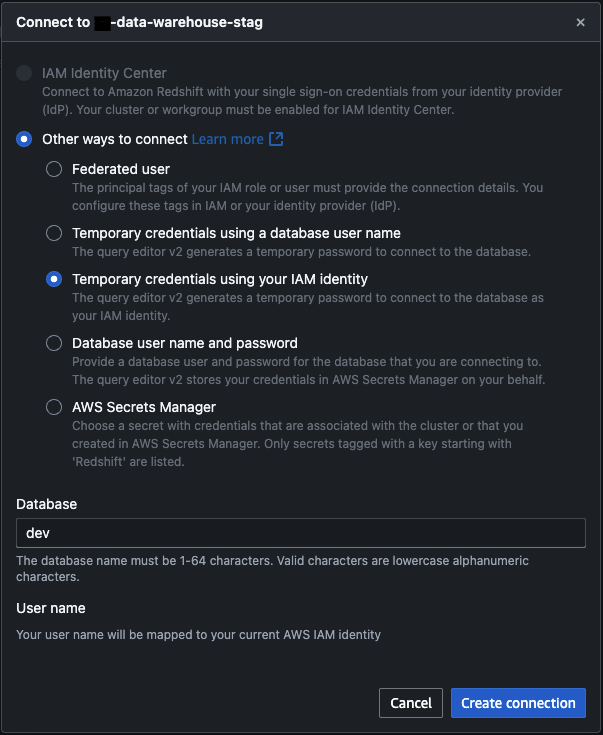
Well, here's the plot twist: IAM doesn't natively work with Redshift's in-database authentication. So what actually happens is a beautiful Rube Goldberg machine where:
- Your tools create temporary IAM credentials
- Those credentials map to a specific database user (like
readonlyoradmin) - You use those temporary credentials to authenticate as that database user
And here's where it gets really fun: Redshift databases require superadmin users to have a password set. Not that you'd use it, but it has to exist. Thanks, PostgreSQL heritage, for this delightful quirk.
Path 3: The "Enterprise Identity Provider" Escape Hatch
Some brave souls attempt to integrate with Azure AD or on-premises Active Directory. It's a thing that exists, people talk about it at conferences, and I'm sure someone, somewhere, has made it work beautifully.
But we're not talking about that today because, let's be honest, most of us aren't living in that particular paradise.
Why Each Path Leads to Pain
Now that we've laid out our options, let's dive into why each one systematically destroys the will to live of everyone involved.
The IAM Trap: When Security Theater Meets Developer Misery
You'd think IAM would be the silver bullet, right? Temporary credentials, proper AWS integration, all that good stuff. But here's where reality comes crashing down like a poorly configured load balancer.
The User Experience Nightmare
Instead of running a simple psql command like a civilized human being, your developers now have to:
- Use the AWS CLI to get temporary credentials
- Copy-paste those credentials somewhere (with all the usual AWS charm of 47-character strings)
- Use those credentials to authenticate to the database
- Pray that nothing expires in the middle of their work
I've watched senior engineers (people who can debug distributed systems in their sleep) spend 15 minutes just trying to connect to a database to run a single query. The authentication overhead completely disrupts their workflow.
The Compliance Problem That Nobody Talks About
But here's the real kicker, the one that makes compliance teams break out in cold sweats: accountability.
Most data warehouses contain more sensitive user data than your average operational database. When SOX compliance comes knocking (and oh, they will come knocking), they want to know exactly who made what changes to production data.
So you've got your beautiful IAM setup where everyone authenticates as the admin user. Congratulations! Your audit log now looks like this:
2025-03-17 14:23:15 - admin: DELETE FROM users WHERE status = 'inactive'
2025-03-17 14:24:32 - admin: UPDATE sales_data SET amount = amount * 1.1
2025-03-17 14:25:41 - admin: DROP TABLE customer_pii
When the auditor asks, "Who deleted that user data?" your answer is, "Well, it was one of these 127 people who have admin access..."
That's not going to fly.
You might think, "Let's just use temporary IAM credentials for individual usernames!" And yes, that works. But at that point, you've built the world's most complicated password manager. You're not really improving security. You're just making everything slower and more frustrating.
The Username/Password Quicksand
On the flip side, maybe dedicated usernames and passwords are the way to go? It's definitely faster, nothing expires in the middle of your work, and it "just works."
Famous last words.
The Great User Drift
Let me paint you a picture. You launch your beautiful new data warehouse. You've got 150 engineers who need access. The IT team is on it. They're creating accounts, setting up permissions, everything's humming along nicely.
Fast forward six months. Your company has grown, people have changed teams, Bob from marketing left for that startup, and three contractors finished their projects. How many of those original 150 database accounts are still valid?
Nobody knows. Managing in-database authentication becomes an impossible task when you have no visibility into your organization's actual structure.
Here's what happens in practice:
- Creating users: Not too bad. File a ticket, wait a few days, get your credentials.
- Updating permissions: Requires coordination between IT, the data team, and whoever understands your table structure.
- Removing users: What removal process? Bob's account is still there, along with accounts for three people whose names nobody recognizes.
Your Redshift user list becomes a archaeological dig site of former employees, abandoned test accounts, and service accounts that someone created for "temporary" integration work two years ago.
The Permission Labyrinth
And let's talk about permissions management. You've got tables, schemas, row-level security, column-level access. The complexity grows exponentially as your organization scales, and without proper tooling, it becomes completely unmanageable.
Without a declarative approach, permission management becomes tribal knowledge. "Oh, Sarah can't see the sales data because she's in the marketing group, but she needs access to the user behavior tables, except for the PII columns, unless it's for the quarterly report, in which case she needs temporary access to..."
Your head is spinning, and you haven't even gotten to the actual data work yet.
The Great Escape: Building Our Way Out
Alright, enough with the doom and gloom. Let's talk solutions. After experiencing these authentication challenges firsthand, I decided to stop complaining and start building.
My Philosophy: Security Should Make Things Better, Not Worse
Here's my core belief: platform security is a developer experience problem. If your security solution makes developers' lives worse, it's not a good security solution.
The best security is the kind that developers don't even notice because it's seamlessly integrated into their workflow. When developers have to choose between getting their work done and following security protocols, they'll find creative ways around your protocols every single time.
So the question became: How do we make Redshift authentication more secure AND more pleasant to use?
Enter DWAM: The Datawarehouse Access Manager
I built DWAM (Datawarehouse Access Manager) as a lightweight tool that tackles the core problems we've been discussing. It's not rocket science. It's just thoughtful automation applied to a genuinely annoying problem.
Here's what DWAM does:
1. Automatic Synchronization with Your Identity Provider
The tool syncs with Okta (or your identity provider of choice) and monitors group memberships. When someone leaves the company, their database access disappears automatically. When they change teams, their permissions update to match their new role.
No more archaeological digs through user lists. No more "Who the hell is bob_contractor_2023?" moments.
2. Declarative Configuration (Because YAML is Life)
Remember the permission labyrinth I mentioned earlier? DWAM makes it declarative. Here's what that looks like in practice:
warehouses:
  production:
    cluster: "analytics-prod.redshift.amazonaws.com"
    database: "analytics"
  staging:
    cluster: "analytics-staging.redshift.amazonaws.com"
    database: "analytics_dev"

groups:
  data_scientists:
    permissions:
      - read_access: ["user_behavior", "product_metrics"]
      - column_filter: "pii_columns"
    okta_groups: ["data-science", "analytics-team"]
    okta_users: ["sarah.exceptional"]  # Exception for non-datascience engineer

  sales_team:
    permissions:
      - read_access: ["sales_data", "revenue_metrics"]
      - write_access: ["sales_staging"]
    okta_groups: ["sales"]

  marketing_team:
    permissions:
      - read_access: ["marketing_data", "user_behavior"]
      - write_access: ["marketing_staging"]
    okta_groups: ["marketing"]
Now your permissions are version-controlled, reviewable, and auditable. When the compliance team asks who has access to what, you point them to your git history.
3. Better Tooling That Actually Improves The Process
But here's the real magic: making the secure path the easy path.
The CLI Tool That Doesn't Hate Its Users
Instead of making developers memorize connection strings, environment variables, and SSL settings, I built a CLI tool that speaks human:
redshift
Error: You must specify exactly two arguments: warehouse and environment

Usage: redshift {analytics|marketing|sales} {stag|prod} [options]

Arguments:
  warehouse      Data warehouse type:
                 analytics   - Analytics Data Warehouse
                 marketing   - Marketing Data Warehouse
                 sales       - Sales Data Warehouse
  environment    Environment (stag or prod)

Options:
  -U string
        Database user
  -auto-create
        Auto-create database user if it doesn't exist
  -d string
        Database name (overrides environment default)
  -host string
        Redshift host address (overrides environment default)
  -port string
        Redshift port (default "5439")
  -r string
        AWS region (default "us-east-1")
That's it. Three words, and you're connected. The tool handles all the authentication complexity behind the scenes: getting IAM credentials, mapping them to your database user, setting up the connection.
Here's what this looks like in practice:
# Before DWAM
export PGPASSWORD=$(aws redshift get-cluster-credentials --cluster-identifier my-cluster --db-user myuser --db-name analytics --region us-east-1 --query DbPassword --output text)
export PGUSER=$(aws redshift get-cluster-credentials --cluster-identifier my-cluster --db-user myuser --db-name analytics --region us-east-1 --query DbUser --output text)
psql -h my-cluster.abc123.us-east-1.redshift.amazonaws.com -p 5439 -d analytics -U $PGUSER

# After DWAM
redshift analytics prod
The difference is night and day. Developers went from spending 5-10 minutes on connection setup to being productive immediately.
Plugin Automation: Meeting Users Where They Are
Not everyone lives in the terminal (shocking, I know). Most data scientists and analysts use tools like DataGrip, DBeaver, or Tableau. Moving them away from their comfortable username/password setup required some finesse.
Here's what I did:
Automatic Plugin Installation and Configuration
For each new user, I:
- Set up the AWS authentication plugin in their preferred tool
- Pre-configured database templates for all our warehouses
- Installed everything during their onboarding process
So when Sarah opens DataGrip for the first time, she doesn't see an empty interface with a "figure it out yourself" vibe. Instead, she sees:
- Analytics Data Warehouse (Production)
- Analytics Data Warehouse (Staging)
- Marketing Data Warehouse (Production)
- Sales Data Warehouse (Production)
Each one is pre-configured with IAM authentication. She clicks, it connects, she's productive. The AWS plugin handles all the credential juggling in the background.
The Secret Sauce: Making Migration Seamless
The key insight was that people resist change when it makes their life harder, even temporarily. So instead of asking users to figure out new authentication, I made the new way easier than the old way.
Before: Remember your password, type it in every time, hope it doesn't expire.
After: Click the connection, it just works.
When security improvements also improve user experience, adoption isn't a problem. It's inevitable.
Advanced Security Features That Actually Work
Once you have a solid foundation, you can build some genuinely cool security features.
Dynamic Column-Level Filtering
One of my favorite features is automatic data masking based on user permissions. Instead of managing multiple views or complex permission schemes, the system automatically transforms sensitive data based on who's querying it:
-- What Sarah (in marketing) sees:
SELECT customer_id, ssn, email FROM customers LIMIT 5;
-- Results:
-- 12345, 1****-****-6789, s***@example.com

-- What Bob (in sales) sees:
SELECT customer_id, ssn, email FROM customers LIMIT 5;
-- Results:
-- 12345, 123-45-6789, sarah@example.com
Same query, different results based on the user's clearance level. No need to maintain separate masked tables or remember to use special views.
Audit Logs That Actually Help
With IAM authentication mapped to individual database users and proper tooling, audit logs become genuinely useful:
2025-03-17 14:23:15 - sarah.johnson: SELECT * FROM user_behavior WHERE date > '2025-03-01'
2025-03-17 14:24:32 - bob.sales: UPDATE revenue_staging SET amount = 50000 WHERE transaction_id = 'TXN123'
2025-03-17 14:25:41 - admin.system: VACUUM ANALYZE customer_data
When compliance asks who accessed customer data, you have real answers. When someone accidentally deletes something important, you know exactly who to talk to (and more importantly, you know it was an accident because you can see their query history).
Each user still authenticates using temporary IAM credentials, but those credentials map to a dedicated database user account that matches their identity. This gives us the security benefits of IAM authentication while maintaining full accountability.
The Results: From Pain to Productivity
After rolling out DWAM across the organization, the results were pretty dramatic:
Developer Experience Metrics:
- Connection time: From 5-10 minutes to <30 seconds
- Support tickets: 89% reduction in authentication-related tickets
- User onboarding: From 3-5 days to same-day access
Security Improvements:
- Orphaned accounts: Eliminated through automatic sync
- Compliance audit time: Reduced from weeks to hours
- Data access visibility: Complete audit trail for all queries
Operations Impact:
- IT workload: 95% reduction in manual user management
- Permission drift: Eliminated through declarative config
- Security incidents: Zero authentication-related breaches
But the real victory was cultural. Developers stopped seeing security as an obstacle and started seeing it as a feature. When your security tools make their day easier instead of harder, everyone wins.
Lessons Learned: The Bigger Picture
Building DWAM taught me a few things that apply beyond just Redshift authentication:
1. Security and UX Aren't Opposing Forces
The conventional wisdom is that security requires trade-offs with usability. That's often true for legacy systems that bolt security on as an afterthought. But when you design security into the user experience from the ground up, you can make things both more secure AND more pleasant to use.
2. Automation Beats Documentation Every Time
You can write all the runbooks you want, but if your process requires humans to remember 15 steps and execute them perfectly every time, it will fail. The only way to reliably secure a system is to make the secure path automatic.
3. Developer Experience Is Security Strategy
When developers have to choose between getting their work done and following security protocols, they'll choose productivity every time. The solution isn't to scold them. It's to make security protocols that enhance rather than hinder productivity.
4. Observability Is Half the Battle
You can't secure what you can't see. Having detailed, searchable audit logs isn't just useful for compliance. It's essential for understanding how your systems are actually being used and where the real security risks lie.
Conclusion: Building the Future of Data Security
Redshift authentication doesn't have to be a dumpster fire. The problems we've discussed (user drift, compliance nightmares, developer frustration) aren't inevitable. They're the result of approaching security and usability as competing priorities instead of complementary ones.
The future of platform security lies in making the secure path the easy path. When your security tools improve the developer experience rather than hindering it, adoption becomes natural, compliance becomes achievable, and everyone can focus on the actual work instead of fighting with authentication.
We're living in an era where data is one of the most valuable assets companies have. The tools we use to secure that data should reflect its importance. Not by making access difficult, but by making secure access effortless.
With declarative configuration, automated synchronization, and thoughtful UX design, we can build authentication systems that scale with organizations while keeping both security teams and developers happy. It's not just possible. It's necessary.
The next time someone tells you that security requires sacrificing usability, show them this post. Then build something better.
After all, if we can't make database authentication pleasant in 2025, what are we even doing with our careers?
Building better security tooling isn't just about solving technical problems. It's about changing how organizations think about the relationship between security and productivity. The code for DWAM and similar tools can provide inspiration for your own platform security challenges. Remember: the best security is the kind your users don't even notice because it just works.
For a related look at accessing cloud databases at scale during an engagement, see our post on accessing hundreds of RDS databases with AD credentials. If your organization is wrestling with cloud database security, cloud penetration testing and security engineering can help you build and verify the right controls.
Written by
Founder of PlatformSecurity and veteran security expert with over a decade of experience in offensive security. Recognized penetration testing specialist who has uncovered critical vulnerabilities in Fortune 500 companies, cloud infrastructure, and enterprise applications. Expert in red team operations, cloud security, and vulnerability research with a track record of responsible disclosures and high-impact security findings.