Introduction (The Reorg Tax)
IAM stays invisible until the org moves. Then it becomes the reason releases stall, auditors get vague answers, and people quietly route around Security because the ticket queue moves slower than production.
Classic IAM often anchors production cloud access to titles, teams, and reporting lines. Those anchors drift every quarter while your policies pretend they do not. IdP RBAC for apps and directories is still the right middle layer. The break is using the org chart as the only attach point for shared infrastructure roles.
The mismatch is structural, not managerial. Tie cloud permissions to surfaces that churn (team-shaped IAM roles) and you rebuild policy every time teams rename, merge, or split. Use a layered pyramid (birthright, RBAC groups, service bundles into individual containers) and the same reorg reads as ownership metadata, not a firewall rewrite.
IAM that survives reorgs treats the org chart as metadata, not as cloud policy. Layer-2 groups and job families stay in the IdP. Layer-3 permissions attach to services and individual lifecycles. Team names, managers, and cost centers inform approvals and ownership, not the underlying grant.
This post is the playbook. Through PlatformSecurity I have rolled out the same shape at growing companies and large enterprises, and the integrations change while the core design does not.

A Case Study and the Reusable Pattern
One case study came from SeatGeek, where this pain became impossible to ignore once the company passed 1,200 employees across dozens of AWS accounts. Access requests bounced between IT, Slack threads, and Jira queues. New hires could wait days (sometimes a week) to become productive. Managers often could not answer a basic question ("What does my team currently have access to?"). That environment was also where I first pressure-tested this pattern in production before carrying the same playbook into later PlatformSecurity work at other enterprises.
The biggest warning sign was behavioral, not technical. Manual "ClickOps" changes in AWS became normal. Access was granted ad hoc, often without clear approvals, expiration, or reliable audit trails. Admin privileges spread because broad access was easier to request and faster to grant than precise, scoped permissions.
The response was Checkpoint, a product experience for IAM and not merely a control plane. My platform security team framed the problem around a short list of commitments:
- Make the secure path the easiest path
- Just in time, not just in case
- Self-service by default
- Services are durable, teams are fungible
- Break silos, respect boundaries
These principles map directly to the implementation model in this post (API-first interfaces like web, Slack, and CLI, service-owned bundles as code, risk-based approvals, temporary access by default, and per-user permission containers in AWS Identity Center).
Wherever I have reused that playbook since, regardless of org chart, compliance, or toolchain, the outcome profile stays consistent. Requests complete in seconds, persistent admin access trends toward zero, and teams across engineering and business functions adopt one clear path for access.
The shift showed up in operational metrics, not just principles. Figures below are approximate ranges from that rollout. Your baseline will differ, but the direction of travel should look familiar if shared team cloud roles are the only anchor for production access today.
| Metric | Before (approx.) | After Checkpoint (approx.) |
|---|---|---|
| Time to first productive cloud access | 3-7 days (sometimes longer) | Seconds to minutes for auto-approved bundles |
| Share of requests auto-approved | ~0% | ~70-85%+ once the catalog and matrix mature |
| Standing admin / broad persistent cloud admin | Common, often granted for speed | ~Zero, with admin via time-bounded bundle checkout |
| Access-related ticket / queue volume | High, with IT and Slack as routing layer | ~80-90% reduction vs. prior baseline |
The Anatomy of Access Control Failure
Mapping the org chart to shared cloud roles makes intuitive sense. You have a Backend team, so you create a Backend-Prod role in AWS. Everyone on that team inherits it. It maps cleanly to the org chart, it is easy to explain to leadership, and it feels like good governance.
The failure mode is not RBAC itself. Job-family and team groups in your IdP remain the right tool for coarse entitlements: directory groups, SaaS seats, and application roles that HR and IT already understand. The brittleness shows up when team-shaped infrastructure roles are the only or primary layer for production cloud access, especially when one shared role maps 1:1 to an org chart box that will rename, split, or disappear.
For the first six months, that single-layer model works beautifully. Engineers join teams and automatically get the right cloud access. Managers can point to clear ownership boundaries. Security audits show a tidy structure where permissions align with organizational reality.
Then something changes.
When Teams Split, Merge, or Dissolve
Maybe the Backend team grows too large and splits into API and Services. Now you have engineers who need access to both, but the permissions are separated. Do you create a new combined role? Do you give everyone both roles? Do you restructure everything?
Maybe the company acquires a startup and their Data team merges with yours. Now you have two sets of Data permissions, two sets of policies, and nobody is quite sure which one covers the new analytics pipeline that was launched during the transition.
Maybe a critical project ends and the team disbands. Engineers scatter to other teams, but the role persists. Someone keeps it around "just in case" we need it again. Six months later, three people still have access to systems they have not touched since the project ended, and nobody remembers why.
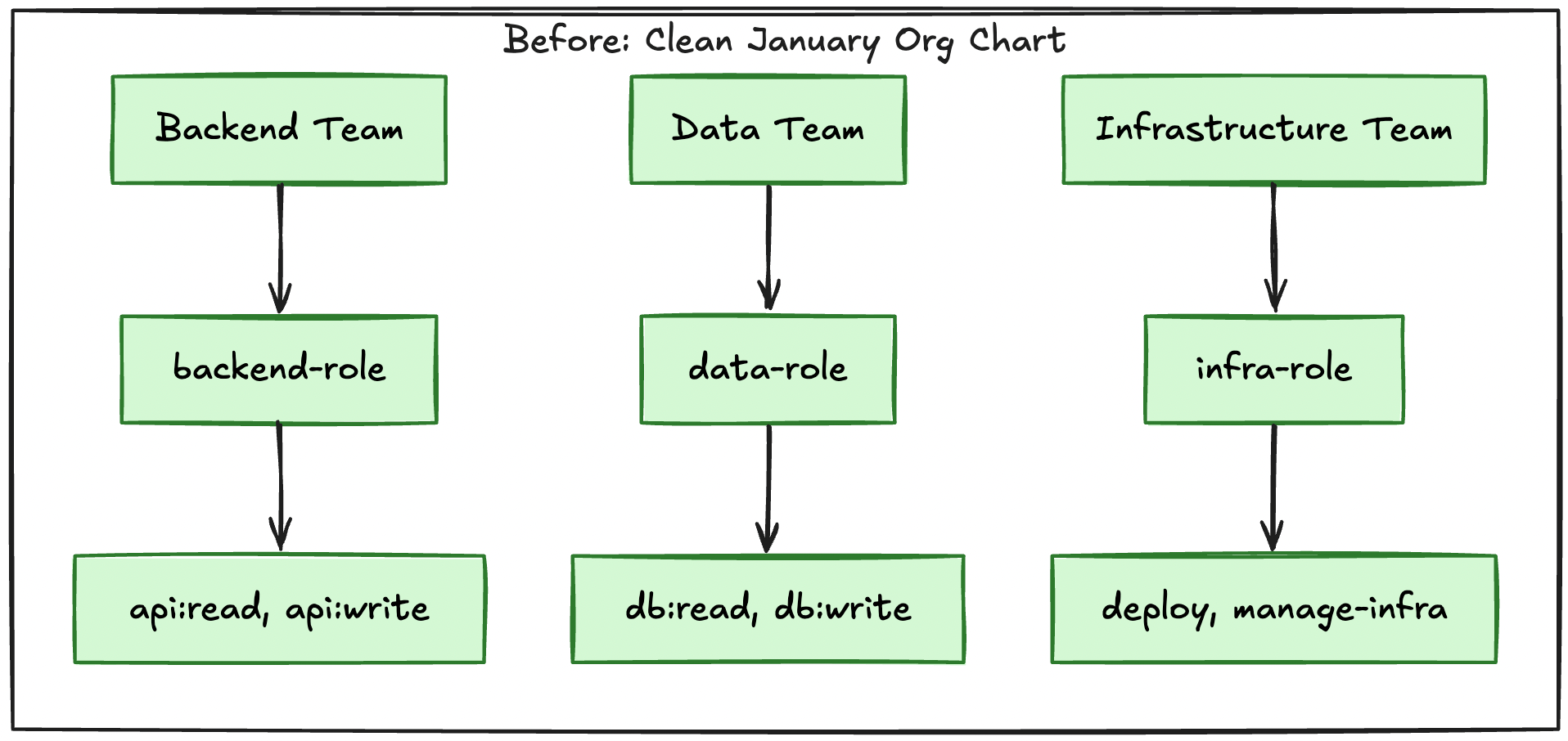
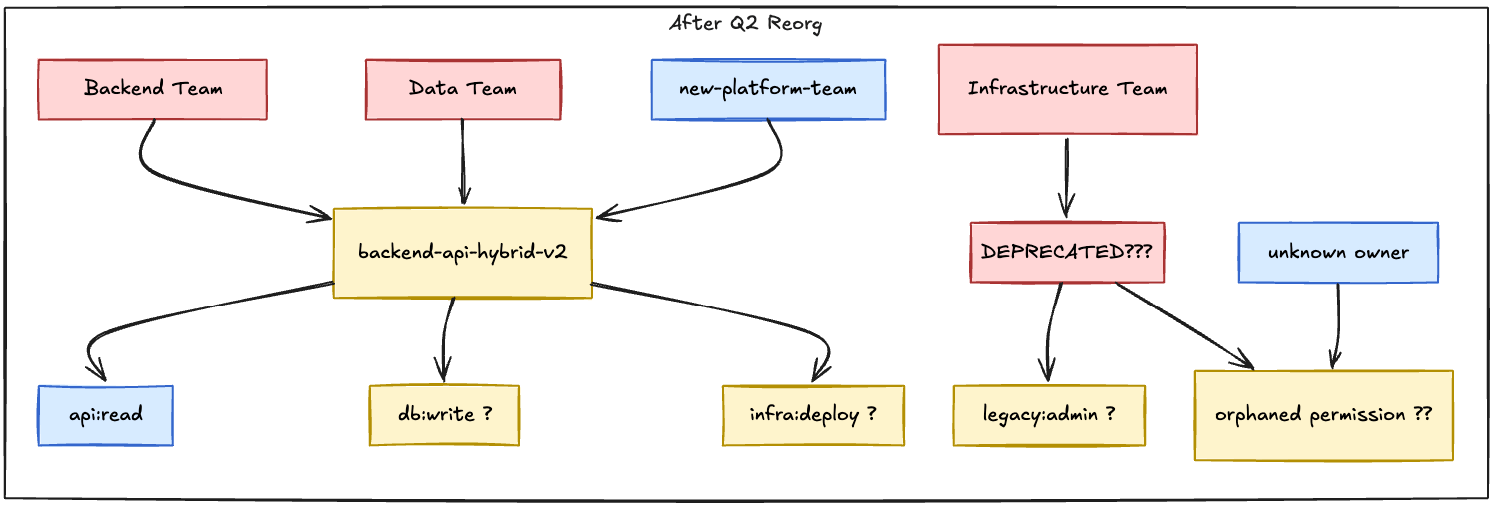
This is not a hypothetical. This is what happens when cloud policy is anchored only to team-shaped roles and the org chart moves underneath them.
The Proliferation of Exceptions
The first exception seems reasonable. An engineer from the Frontend team needs temporary access to the backend database for a migration. You create a one-off policy. It is quick, it is scoped, and it solves the immediate problem.
Then another engineer needs access to staging and production, but the role only covers one. You create another exception. Then someone from a dissolved team needs access to a service their new role does not cover. Another exception. Then a contractor needs a subset of permissions that does not map to any existing role. Another exception.
Within a year, you have more exceptions than rules. Your IAM system becomes a junk drawer of one-off policies, each with a comment like "temp access for Q3 project" that is still there two years later.
Engineers start routing around the system entirely. They share credentials. They use a teammate's access. They escalate to their manager who escalates to platform who eventually just grants admin access because untangling the actual requirement would take three days and the project is due tomorrow.
The secure path becomes the slow path. The fast path becomes the risky path. And the risky path wins.
Why IAM Programs Are Designed to Fail
The symptoms above are familiar. The incentives behind them are less discussed. Most IAM programs optimize for audit artifacts and org-chart legibility, not for engineers shipping safely. Until those incentives change, better runbooks only polish the same failure mode.
Compliance theater and checkbox IAM. Auditors ask for a role matrix, periodic access reviews, and evidence that controls exist. IT delivers spreadsheets mapping job titles to entitlements. Nobody measures time-to-productive-access, standing admin, or whether the secure path is faster than shared credentials. Checkbox IAM rewards binders and attestations, not outcomes. You can pass a review while engineers route around the system every week.
Central IT ownership vs. distributed service ownership. Platform or IT owns the ticket queue. Service teams own the blast radius when access is wrong. Requests sit behind people who do not know your staging database from your production Kafka cluster. The fix is not "hire more IAM analysts." It is pushing bundle definition and approval to owners who understand the service, with platform owning the rails (catalog, API, policy enforcement), not every grant decision.
Vendor and IGA cycle times. SailPoint-style identity governance platforms promise reconciliation across hundreds of applications with workflows measured in weeks. Leadership buys the tool, and engineers still wait days for AWS. The mindset becomes we bought governance instead of we made the secure path fast. Tools that assume stable role catalogs and quarterly provisioning cycles fight companies that reorganize quarterly.
Do not rip out IGA. Keep IGA where it excels at layer 2: app lifecycle, joiner-mover-leaver workflows, and certification evidence for coarse entitlements. Compose it with layer-3 cloud checkout so production access can move at operational speed without breaking governance.
Role catalogs exported from org charts into cloud policy. HR exports titles, and consultants map them to entitlements in workshops. IdP RBAC for apps and directories is appropriate at that layer. The pain starts when the same workshop output becomes shared AWS roles named Backend-Team-Prod-Admin that everyone on Backend inherits. Every reorg invalidates the mapping in IAM, not just in group membership. A team split becomes a policy rewrite, not a metadata update.
Why consultancies perpetuate team-RBAC as the whole program. Team-shaped cloud roles are easy to explain in slide decks and statements of work. A pyramid with birthright, IdP RBAC, and a service catalog is harder to sell as a six-month "identity transformation." The deliverable matches what failed before, with cleaner architecture diagrams. The advice is legible to procurement, not resilient to the next reorg.
Changing IAM means changing what you measure: median time from request to access, auto-approval rate, standing privilege, and ticket volume, not whether the role matrix PDF was refreshed. The rest of this post is the technical shape those metrics assume.
Birthright, RBAC, and bundles (a pyramid, not either/or)
Enterprise IAM at scale is usually described as stacked layers, not a single mechanism. Google's framing of IAM at scale separates birthright access, RBAC through organizational groups, and a privilege-management / service-catalog layer for everything else. This post aligns with that shape. The argument is not "skip RBAC." It is "do not let team org-chart RBAC be the only story for infrastructure that changes every quarter."
Teams route approvals. Services define cloud access.
| What good looks like | What enterprises often buy or operate |
|---|---|
| Layered pyramid with birthright, IdP and IGA RBAC, and service bundle checkout | Team-shaped cloud roles exported from the org chart |
| IGA governs app lifecycle and certifications, while layer 3 handles cloud runtime access | IGA workflow used as the only gate for cloud access changes |
| Per-user cloud containers with JIT expiry and clear ownership metadata | Shared team roles with exceptions and persistent access |
| Service owners define bundles, platform owns rails and policy enforcement | Central queue owns every grant with limited service context |
| Success measured by time to access, low standing admin, and high safe self-service | Success measured by matrix completion and quarterly attestation artifacts |
Layer 1: Birthright. Minimum privileges for every user on hire: SSO, VPN, internal docs, GitHub read, dashboards. Automated from HR and the IdP. Small blast radius, rarely revisited on reorg.
Layer 2: RBAC / team and job-family groups. IdP and IGA groups tied to HR, Finance, Technology, or job families. Still the right place for coarse app access, directory membership, and entitlements that track stable job functions. Reorgs update group membership metadata. They should not require rewriting production IAM policy documents.
Layer 3: Service bundles and individual checkout. Production cloud, break-glass, cross-team work, and anything birthright plus RBAC cannot express cleanly. Pre-defined bundles owned by service teams, checked out into individual permission containers with JIT duration and risk-based approval.
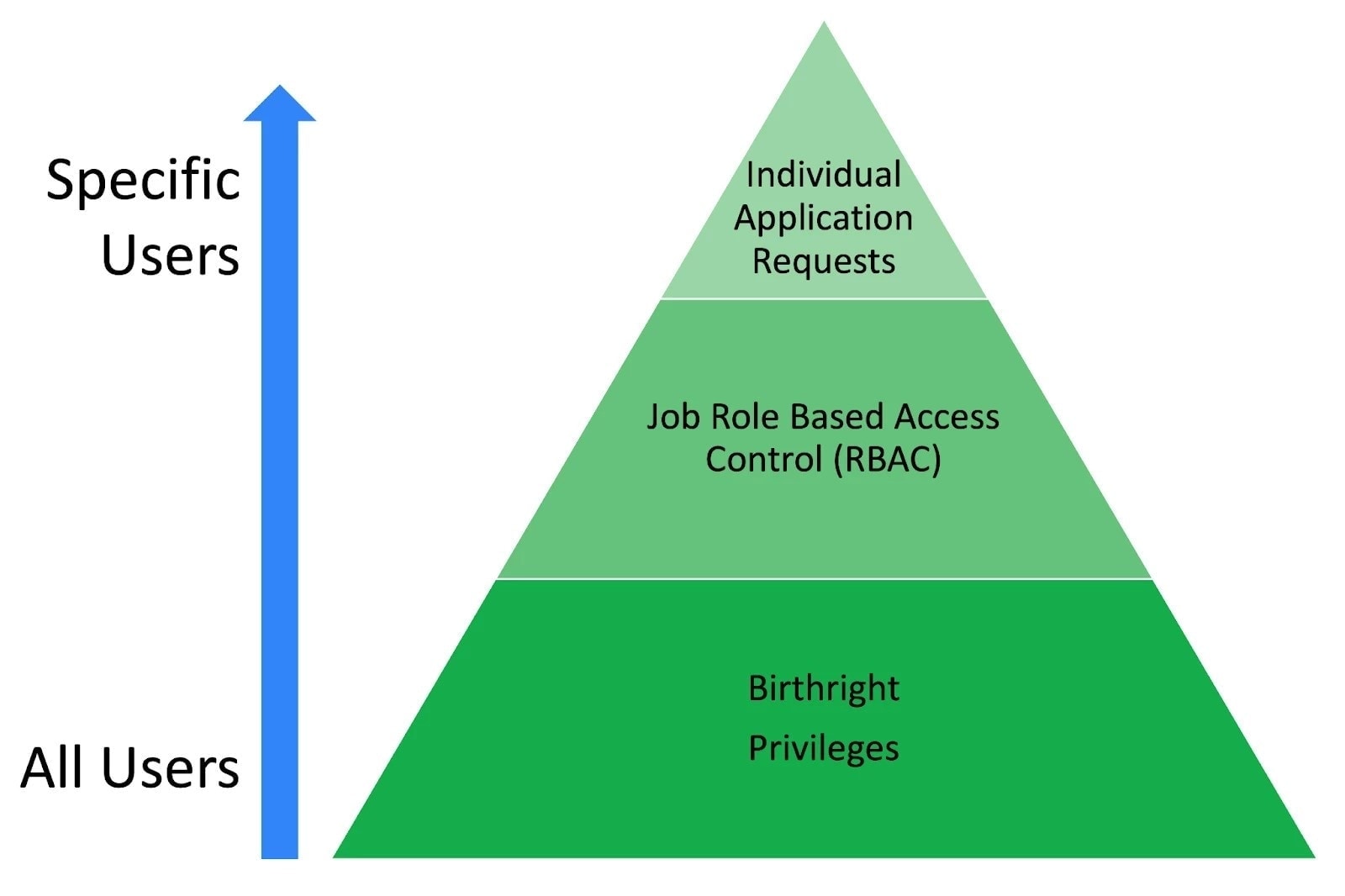
Checkpoint-style implementations concentrate innovation at layers 1 and 3 while respecting layer 2 for what it does well. The sections below walk through IdP identity containers, per-person permission sets in AWS Identity Center, and service-owned bundles as the layer-3 enforcement story.
The Foundation (Choosing the Right Anchors)
If shared team cloud roles are the problem, what do you anchor infrastructure access to instead? The answer is a pyramid: birthright at the base, IdP RBAC in the middle, and three implementation pillars for layer 3: your identity provider as the source of truth, individual permission containers for cloud enforcement, and service-based bundles for what people can request. Get those pillars right and reorgs become metadata updates instead of policy archaeology.
How this composes with your current stack: if you already run Okta with AWS IAM Identity Center, keep that foundation and add bundle checkout as a layer-3 control plane. Keep your existing IGA program for layer-2 app lifecycle and certifications. Keep PAM and JIT tools for privileged sessions. Teleport-style brokered access can remain the session broker while this model governs who can check out cloud permission scope and for how long.
A. Why Okta (or Your IdP) Matters
Your identity provider is the single source of truth for who exists in your company. Whether it is Okta, Azure AD, Google Workspace, or something else, this is where identity starts and where everything else should flow from.
Most companies already use their IdP for SSO and layer-2 RBAC: team groups, job-family groups, and HR-driven entitlements for apps and directories. Keep that. The mistake is mapping those same team groups 1:1 into shared AWS permission sets so production access rides on org chart membership alone.
For layer-3 cloud enforcement, use your IdP to create individual groups for every employee who needs AWS (or equivalent). In one implementation, we created a group called checkpoint-{username} for each person. That group has exactly one member (the person themselves). This becomes their identity container that persists regardless of what team they are on or what their job title says. Team and job-family groups still drive layer 2. They do not need to be the attach point for production bundle checkout.
Your IdP also becomes the integration point for everything downstream. AWS IAM Identity Center, your VPN provider, SaaS applications, and internal services all trust the IdP as the authoritative source. When someone leaves the company, you disable them in one place and access falls out everywhere.

The IdP is not just a login system. It is the foundation for everything that comes next. Treat it that way.
B. Individual-Based Permission Sets
Layer 2 RBAC answers "what job family is this person in?" Layer 3 needs a different anchor for cloud: one permission container per person, not one shared role per team. Instead of creating shared AWS roles that every Backend engineer inherits, you create a unique permission set for each person and attach bundles to that container over time.
In AWS, this means each employee gets their own permission set in IAM Identity Center. That permission set is tied to their individual Okta group, and it contains only the permissions they currently need. When they request access to a service, the relevant policies get added to their set. When that access expires, the policies fall out automatically.
This is the one person, one container model. Each engineer has a dedicated permission set that grows and shrinks dynamically based on the bundles they check out. It is isolated from everyone else, so changes to their access never affect their teammates.
The enforcement layer is AWS IAM Identity Center (formerly AWS SSO). When an engineer logs into the AWS console, they see exactly one role (their personal role). That role reflects the union of all bundles they currently hold. No more choosing between fifteen roles and hoping you picked the right one. No more confusion about which role has the permissions you need.
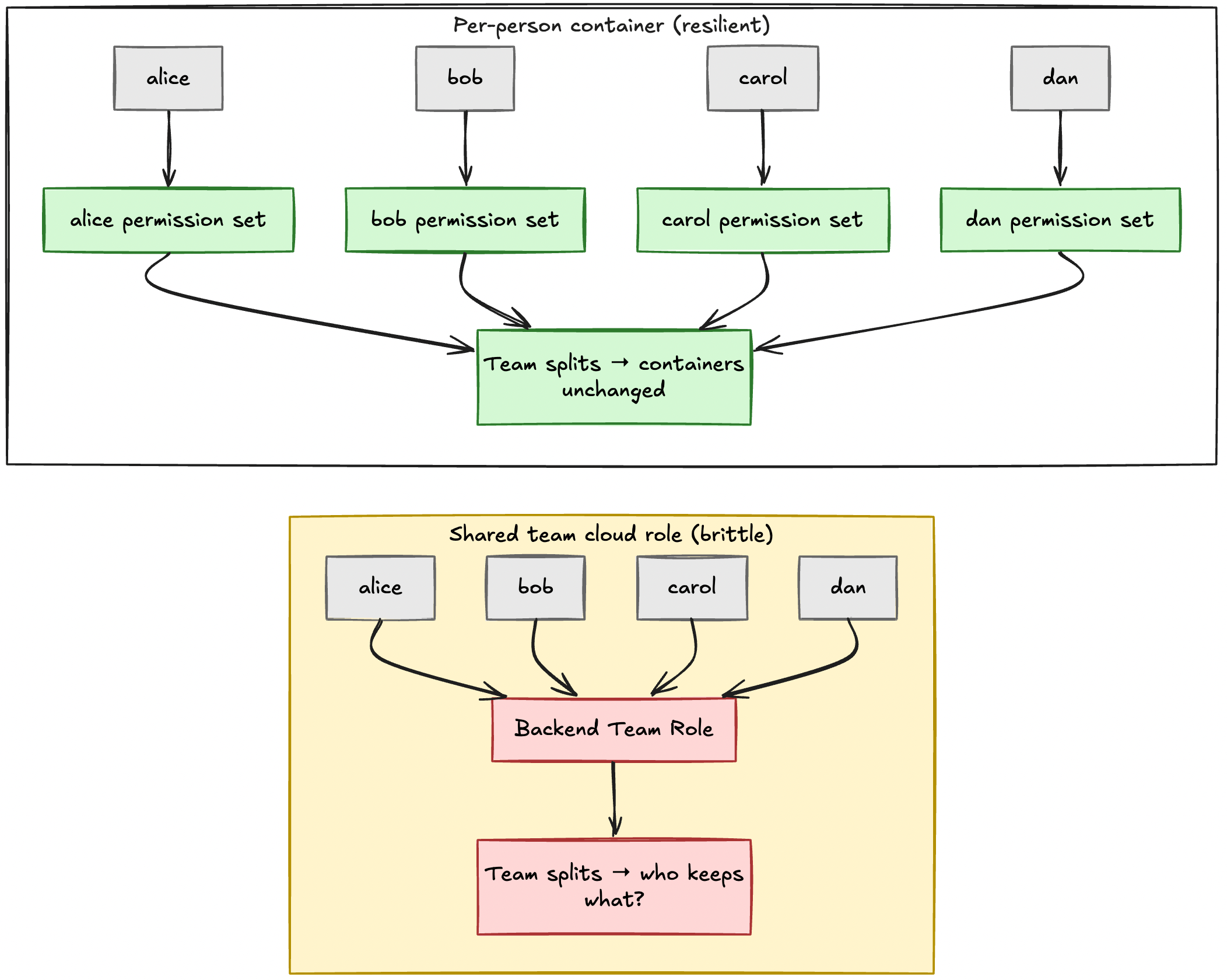
When a reorg happens, individual permission sets survive automatically. The engineer moves from the API team to the Infrastructure team, but their permission set does not care. It still contains the bundles they checked out, regardless of what team name appears on the org chart. If they need different access for their new role, they request the new bundles and let the old ones expire. No manual migration. No policy rewrites. No toil.
This model also eliminates privilege creep. Because access is temporary by default and tied to explicit requests, people only hold the permissions they actively asked for. When someone changes roles, they are not carrying forward stale access from their previous team. The system resets cleanly.
C. Service-Based Bundles Over Job-Based Cloud Roles
Individual permission sets solve the layer-3 identity container problem, but you still need to define what permissions people can request. This is where bundles come in. They sit above birthright and IdP RBAC: coarse group membership gets you into the building, bundles get you into specific production systems.
A bundle is a pre-defined set of permissions tied to a service or workflow. Instead of requesting raw AWS policies or piecing together individual permissions, engineers request access to a bundle. The API-Production bundle grants read and limited write access to the production API infrastructure. The Data-Warehouse bundle grants query access to the analytics warehouse. The Analytics-Staging bundle grants full access to the staging analytics environment.
Bundles are durable because they are tied to services, and services outlive teams. The API does not get renamed when the Backend team becomes the Services team. The database does not reorganize when your data org splits into Platform Data and Analytics. If you anchor permissions to the services themselves, they survive organizational change.
| Bundle | Owner | Description | Risk |
|---|---|---|---|
| API-Production | api-team | Read access to production API, limited write to logs and metrics | High |
| Data-Warehouse | data-platform | Query access to Redshift analytics warehouse | Medium |
| Analytics-Staging | analytics-eng | Full access to staging analytics environment | Low |
| Kubernetes-Prod-Debug | infrastructure | Read-only access to production Kubernetes for debugging | Critical |
Bundles are defined as code, typically in Terraform, and stored in version control alongside the service infrastructure. The team that owns the service defines the bundle, sets the risk level, and specifies the approval requirements. When the service changes, the bundle definition changes with it. Ownership is tied to the codebase, not to HR records or org charts.
This creates a stable interface between people and permissions. Engineers do not need to know the underlying IAM policies or which specific AWS actions they need. They just need to know which service they want to access. The bundle abstracts the complexity and keeps the catalog consistent even as the underlying infrastructure evolves.
Service-based bundles also make access transparent. Anyone in the company can browse the catalog and see what bundles exist, who owns them, and what they grant access to. If you need access to the production API, you search for "API" in the catalog, find the right bundle, and request it. No secret knowledge required. No tickets to platform asking what role you need.
One subtle but important design choice is where HR-driven RBAC stops and the catalog starts. Birthright stays minimal (layer 1). Team and job-family groups in the IdP stay valuable for coarse entitlements (layer 2). For production cloud and other high-churn infrastructure, avoid exporting the org chart into shared IAM roles. Use bundles and checkout into individual containers (layer 3) instead.
This is the foundation. Birthright and IdP RBAC handle layers 1 and 2. Individual identity containers and permission sets enforce layer 3 in the cloud. Service-based bundles populate those containers dynamically. Build on this pyramid, and the rest of the system becomes straightforward. Collapse everything into team-shaped cloud roles, and you will spend the next three years fighting the same reorg tax everyone else pays.
Building the Request and Approval System
The foundation is in place. You have individual identity containers, service-based bundles, and a durable permission model. Now it needs to feel usable in day-to-day work.
Make the secure path the fast path. If engineers can get the access they need in seconds through the official system, they will not route around it. If every request turns into a three-day ticket queue, they will find workarounds.
A. Risk-Based Decisioning
Not all access requests carry the same risk. Requesting read access to a staging environment for one day is fundamentally different from requesting admin access to production databases for a month. The approval process should reflect that difference.
Bundle Metadata (Risk Levels Assigned by Owners)
Every bundle has a risk level assigned by the team that owns it. These levels are explicit metadata defined in the bundle configuration, usually expressed as one of the bands below.
- Low. Read-only access to non-production systems, internal tools, staging environments.
- Medium. Write access to staging, read access to production logs or metrics.
- High. Write access to production systems, database query access, API keys.
- Critical. Admin access, production database writes, infrastructure control planes.
The service owner sets this level when they define the bundle. It gets reviewed during code review and audited quarterly to ensure it stays accurate as the service evolves. Risk levels are not guesses. They are documented decisions that reflect the actual blast radius if the access is misused.
Request Context (Duration and Relationship to Service)
The risk level of the bundle is only half the equation. The other half is the context of the request itself.
- Duration. How long is the access being requested? One day? One week? Thirty days?
- Requester relationship. Is the person requesting access on the team that owns the bundle, or are they from another team?
A seven-day request from someone on the owning team carries less risk than a thirty-day request from someone outside that team. The approval system evaluates both factors together.
The Approval Matrix (Auto vs. Owner vs. Platform)
The risk level and request context feed into a decision matrix that determines the approval path. The matrix is transparent and consistent, so engineers know what to expect before they submit a request.
| Risk Level | 1 Day | 1 Week | 2 Weeks | 30+ Days |
|---|---|---|---|---|
| Low | Auto (all) | Auto (all) | Auto (owner) | Owner approval |
| Medium | Auto (all) | Auto (owner) | Owner approval | Owner approval |
| High | Auto (owner) | Owner approval | Owner approval | @platform-team approval |
| Critical | Owner approval | Owner approval | @platform-team approval | @platform-team approval |
Legend.
- Auto (all). Instant access for everyone with no human approval.
- Auto (owner). Instant access if the requester is on the owning team. Otherwise owner approval applies.
- Owner approval. Approval from the service owner.
- @platform-team approval. Approval from @platform-team or security.
The matrix creates natural incentives. If you need access quickly, request it for a shorter duration. If you need it for longer, expect additional scrutiny. If you are on the team that owns the service, you get more flexibility. If you are requesting access to a critical system from outside the team, expect platform oversight.
This is not arbitrary gatekeeping. It is a calibrated system that balances speed with safety. Low-risk requests flow through instantly. High-risk requests get reviewed by people with context. The system scales because most requests auto-approve, and only the truly risky ones require human judgment.
B. Interface Design for Adoption
A request and approval system is only useful if people actually use it. That means meeting them where they already work and making the experience faster than the workarounds.
Meeting Users Where They Work
Engineers do not live in a dedicated IAM portal. They live in Slack, in their terminal, and occasionally in a web browser. Your access system should be available in all three. Non-technical users often prefer Slack because that is where their day-to-day work already happens: approvals, questions, and handoffs stay in one place instead of a separate IAM portal they never open.
- Slack (slash command or dialog). Meet people in-channel. A slash command works for power users:
/checkpoint request api-production --duration 7d --reason "debugging latency spike"posts a structured request without leaving the thread. A Slack dialog or modal (interactive form) is the better default for everyone else: pick bundle, duration, and reason from dropdowns and text fields, then submit. Same API underneath, with a different surface for different comfort levels. - CLI. Integration with your existing developer tooling. If you already have a CLI for deployments or database access, add access requests to the same interface. Engineers should not have to context-switch to a separate tool.
- Web UI. A clean, simple interface for browsing the catalog and submitting requests. This is the entry point for non-technical teams and new engineers who are still learning the CLI.
$ checkpoint request api-production --duration 7d --reason "debugging latency spike"

✓ Bundle found: api-production (owner api-team, risk High)
✓ Requesting access for 7 days
✓ Auto-approved (you are on the owning team)
✓ Access granted (expires 2026-05-31)

You can now access:
  - AWS permission set via IAM Identity Center (prod IAM role for S3)
  - Read/write on production API RDS (api-production cluster)
  - Vault paths for api-production secrets (read)
The interface is not just about where the request happens. It is about how fast it happens. A CLI command that completes in two seconds is competing with shared credentials or asking a teammate for their access. It has to be faster than the workaround, or people will not use it.
Self-Service Catalog That Engineers Trust
The bundle catalog is the discoverability layer. Engineers should be able to search for what they need, see who owns it, and understand what it grants access to without asking anyone.
The catalog shows the details below.
- Bundle name and description. Clear, specific language about what the bundle does.
- Owner. The team responsible for the service and for approving non-standard requests.
- Risk level. Transparency about how sensitive the access is.
- Typical duration. Guidance on what is usually approved (for example "Most requests are approved for 1-7 days").
- Recent requests. Who else has requested this bundle and for how long, which builds trust that others use the same path.
This transparency builds adoption. If an engineer sees that their teammates are requesting the same bundles through the official system, they trust it. If the catalog is empty or out of date, they assume the system is not real and route around it.
Approval Cards That Take Seconds, Not Tickets
When a request requires human approval, it should not turn into a ticketing system. Approvals happen in Slack with interactive cards that contain everything the approver needs to make a decision.
🔐 Access Request

Matthew Keeley is requesting access to api-production

Bundle       api-production
Owner        @api-team
Risk         High
Duration     7 days
Reason       Debugging latency spike in checkout flow
Ticket       PROJ-1234

[Approve]  [Deny]  [Ask in thread]
The approver can click Approve and the requester gets access immediately. They can click Deny and include a reason. They can ask for more context in the thread without blocking the request entirely. The entire flow happens in Slack in under a minute.
Compare this to a traditional ticketing system where the request goes into a queue, the approver has to log into a separate portal, the ticket sits for hours or days, and by the time it is approved the engineer has already found a workaround. Approval cards eliminate that friction.
C. Temporary Access as the Default
Permanent access is the enemy of least privilege. Make expiration the default and the approval matrix does double duty: shorter durations auto-approve more often, and grants fall out of permission sets without quarterly access-review theater.

Engineers can extend before expiry if work runs long. The cultural nudge is built in: ask for a day, get instant access. Ask for a month, expect platform scrutiny. Most grants never reach a manual audit because they expire first. You only review the small set of renewed or standing exceptions.
Implementing the System
Building an access control system that survives reorgs requires more than good ideas. It requires implementation that is maintainable, auditable, and extensible.
A. Technical Architecture Overview
The system is built API-first, with all logic centralized in a single service that multiple interfaces consume. This design keeps the approval rules, bundle definitions, and permission updates consistent regardless of where the request originates.
API-First Design for Multiple Interfaces
At the core is an API service that handles the workloads below.
- Bundle catalog queries
- Access requests and approvals
- Permission set updates in AWS IAM Identity Center
- Expiration tracking and automatic cleanup
- Audit logging
The Web UI, Slack bot, and CLI are all thin clients that call this API. They handle presentation and user interaction, but all business logic lives in the API layer. This means you can add a new interface (a mobile app, a Jira integration, a PagerDuty plugin) without duplicating approval logic or risking inconsistency.
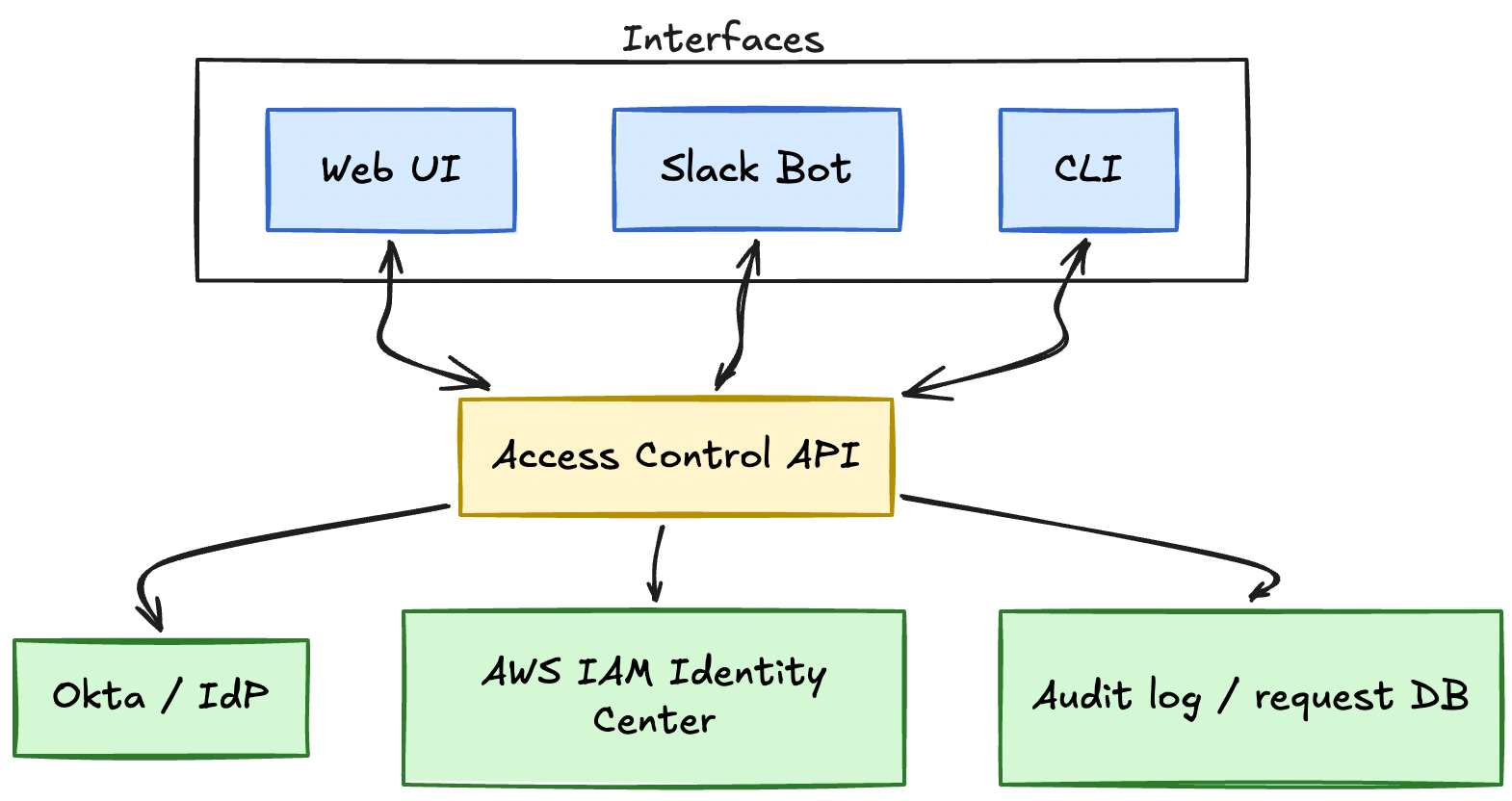
The API is stateless and horizontally scalable. Request state lives in a database (PostgreSQL works well), and the approval workflow is event-driven. When a request is submitted, the API evaluates the risk matrix, routes it to the appropriate approver (or auto-approves), and triggers permission updates when approved.
Bundle Definitions as Code
Bundles are not stored in a database or managed through an admin UI. They are defined as Terraform code and live in version control alongside the infrastructure they grant access to.
A typical bundle definition looks like the example below.
resource "checkpoint_bundle" "api_production" {
  name        = "api-production"
  description = "Production API: RDS read, prod S3 via IAM role, Vault secrets read"
  owner_team  = "api-team"
  risk_level  = "high"

  # IAM Identity Center permission set attachments (AWS)
  aws_policies = [
    aws_iam_policy.api_prod_s3_read.arn,
    aws_iam_policy.api_rds_connect.arn,
  ]

  # Database (production API RDS)
  rds {
    cluster_id     = aws_rds_cluster.api_production.id
    grant          = "read"
    database_users = ["api_readonly"]
  }

  # Object storage (prod bucket via assumed role)
  s3 {
    role_arn   = aws_iam_role.api_production_s3.arn
    bucket_arn = aws_s3_bucket.api_production_assets.arn
    prefix     = "uploads/*"
    actions    = ["s3:GetObject", "s3:ListBucket"]
  }

  # Secrets (HashiCorp Vault paths for this service)
  vault {
    path_prefix = "secret/data/api-production/"
    policies    = ["api-production-read"]
  }

  approval_rules {
    max_auto_approve_duration = "1d"
    require_owner_approval    = true
  }
}
When the Terraform runs, it pushes the bundle definition to the API. The API validates it, updates the catalog, and makes it available for requests. Changes to bundles go through the same code review process as infrastructure changes, with CODEOWNERS ensuring the owning team approves modifications.
This approach has several advantages.
- Auditability. Every bundle change is a Git commit with a reviewer and timestamp.
- Ownership. The team that owns the service owns the bundle definition.
- Discoverability. You can grep the codebase to find all bundles related to a service.
- Rollback. If a bundle change causes issues, you can revert the commit and redeploy.
Real-Time Permission Set Updates
When a request is approved, the system updates the user's AWS IAM Identity Center permission set immediately. This happens in seconds, not minutes or hours.
The flow follows these steps.
- Request approved (either auto-approved or manually approved in Slack)
- API calls AWS IAM Identity Center API to attach the bundle's policies to the user's permission set
- AWS propagates the change (typically completes in under 10 seconds)
- User can retry their AWS console login or CLI command and access is live
When access expires, the reverse happens automatically. A background job monitors expiration timestamps, and when a bundle reaches its expiration date, the API removes the policies from the user's permission set. No manual intervention. No cleanup tickets.
B. Onboarding Automation
New employee onboarding is where most IAM systems create the most friction. Accounts have to be created, permissions have to be assigned, and someone has to remember to do it all before the new hire's first day. Automation eliminates this entirely.
New User Provisioning Flow
The onboarding flow is triggered the moment a new employee is added to Okta with AWS access enabled. From there, everything is automatic.
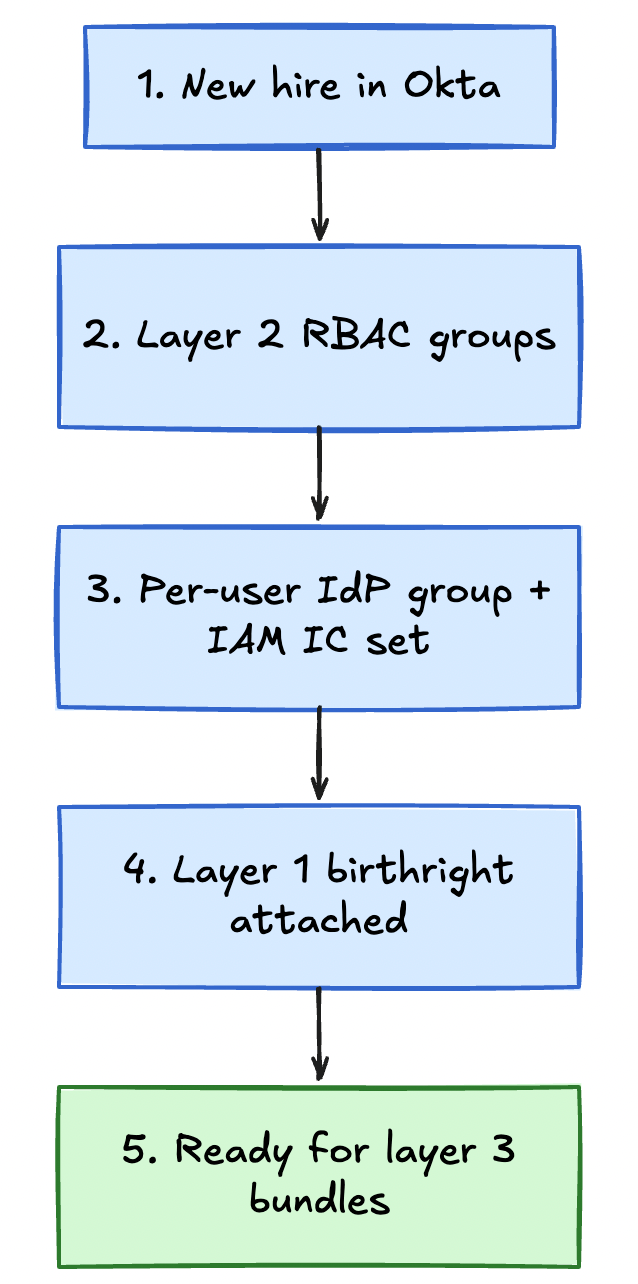
The automation works as follows.
Step 1 New hire added to Okta (layer 1 and 2 kickoff)
HR or IT adds the new employee to Okta, assigns SSO apps, and places them in the appropriate team and job-family groups (layer 2 RBAC): for example eng-technology, team-api, or finance-facing groups for non-engineers. Those groups provision coarse app and directory access the same way they do today.
Step 2 Per-user identity container created (layer 3 prep)
An Okta workflow or external automation detects AWS-eligible users and creates a group named checkpoint-{username}. The new employee is added as the only member. This is separate from team membership: team groups stay for layer 2, the per-user group is the attach point for cloud bundle checkout.
Step 3 Individual permission set provisioned The access control API (or a separate provisioning service) detects the new per-user group and calls the AWS IAM Identity Center API to create a permission set for that user. The permission set is initially empty except for the trust policy that allows Okta to federate into it.
Step 4 Birthright access applied (layer 1 in the cloud) The system attaches a baseline set of policies to the new permission set. Birthright access typically includes the items below.
- Read access to internal documentation and wikis
- Access to collaboration tools (Slack, email, calendar)
- Basic engineering tools (GitHub read access, CI/CD dashboards)
- VPN access to non-production environments
Birthright access is intentionally minimal. It is enough to get started but not enough to do damage. Production scope and other sensitive cloud permissions require an explicit layer 3 bundle request through the catalog.
Step 5 Ready to request bundles (layer 3) The new employee receives a welcome email or Slack message with a link to the bundle catalog and instructions on how to request access. By the time they sit down on their first day, layers 1 and 2 are in place from HR/IdP flows, the individual cloud container exists, and they can checkout bundles for what they actually need to ship.
First Bundle Request Experience
The first time an engineer requests a bundle, the system should feel obvious and frictionless. They open the catalog, search for what they need, click Request, and get access in seconds (for low-risk bundles) or see a clear status update (for bundles requiring approval).
The catalog UI makes the following facts obvious.
- What each bundle grants access to
- Who owns it
- What the typical approval time is
- Whether their request will auto-approve based on duration
For new hires, layer 2 groups may already grant coarse access to shared tools. The most common first layer 3 requests are for their team's primary service bundles. If they join the API team, they request api-staging and api-production. If they join the Data team, they request data-warehouse and analytics-staging. Because these are owned by their own team and requested for short durations, they auto-approve immediately.
This creates a positive first impression. The system works the way they expect, it is fast, and it gives them exactly what they need without unnecessary friction.
C. Logging and Auditability
Transparency and auditability are not optional. Regulators, auditors, and security teams need to know who had access to what, when they got it, who approved it, and when it expired. The logging layer provides this without creating friction for engineers.
Public Request Database for Transparency
Every access request, approval, denial, and expiration is logged in a database that is queryable by anyone in the company. This is not a hidden audit log that only security can access. It is a public record.
Engineers can query the database so they can do the following:
- See who else has requested a particular bundle and for how long
- Check if their request was approved or if it is still pending
- Review their own access history
- Find examples of successful requests to model their own
This transparency builds trust. Engineers see that the system is real, that their peers use it, and that approvals happen quickly. It also makes the system self-documenting. Instead of asking "how do I get access to X," engineers can search the request log, see what bundle someone else used, and request the same one.
| Timestamp | User | Bundle | Duration | Approver | Status | Expires |
|---|---|---|---|---|---|---|
| 2026-05-02 09:15 | mkeeley | api-production | 7 days | auto-approved | active | 2026-05-09 |
| 2026-05-02 08:42 | jsmith | data-warehouse | 14 days | @data-team | approved | 2026-05-16 |
| 2026-05-01 16:30 | achen | kubernetes-prod-debug | 1 day | auto-approved | expired | 2026-05-02 |
| 2026-05-01 14:20 | mjones | analytics-staging | 30 days | @platform-team | denied | n/a |
| 2026-05-01 11:05 | rdavis | api-staging | 3 days | auto-approved | expired | 2026-05-04 |
Compliance Requirements Without Friction
Auditors typically ask questions shaped like these.
- Who had admin access to production in Q2?
- How long did access requests take to approve on average?
- Were there any requests that bypassed the approval process?
- Which bundles have the longest average request durations?
With a structured request log, these questions are SQL queries, not manual spreadsheet work. The system generates compliance reports automatically. Security and compliance teams can run queries, export results, and provide documentation without digging through Slack threads or ticketing systems.
The logging layer also tracks the behaviors below.
- Failed access attempts. When someone tries to access a resource they do not have permissions for, AWS logs the denial, and the access control system can correlate it with their current bundle set to suggest which bundle they might need.
- Policy changes. When a bundle definition changes in Terraform, the diff is logged alongside the commit hash and reviewer.
- Manual overrides. If platform or security manually grants access outside the normal flow (rare, but sometimes necessary during incidents), it is logged as an exception with justification.
Historical Access Patterns for Security Review
Beyond compliance, the request log provides valuable security insights. Patterns emerge over time, including trends such as these.
- A bundle that is consistently requested for 30+ days might indicate that it should be split into a high-risk subset and a lower-risk read-only variant.
- A bundle that nobody has requested in six months might be deprecated or merged with another bundle.
- A sudden spike in requests for a critical bundle might indicate an ongoing incident or attack.
Security teams can monitor these patterns and adjust bundle definitions, risk levels, and approval rules accordingly.
Surviving Reorgs and Mergers in Practice
Bundles anchor to services and infrastructure: the permission story stays steady when people reshuffle. You update ownership metadata (approvers, Slack routes, owner_team). Policy attach lists stay stable unless the workload itself changes.
When a team renames, you change metadata, not policy attachments. Example: only owner_team and Slack approver routing update. IAM policy ARNs on the bundle stay the same.
# Before reorg
owner_team = "payments-core"
slack_approvers = ["@payments-core-oncall"]

# After reorg (same policies, new stewardship)
owner_team = "platform-runtime"
slack_approvers = ["@platform-runtime-oncall"]
# aws_policies = [...]  # unchanged
Changing orgs vs changing systems
- Reorgs.
payments-ledger-staginggrants the same access whether the steward was Payments-Core or Platform-Runtime. Engineers request against the workload, not the latest team acronym. - M&A. Import bundles with acquired workloads. Map approvers and compliance tags on day one, not reconciling two org-chart-driven cloud role matrices.
- People. Federation subject plus layer-1 birthright stays modest. Layer-2 group membership updates with HR. Prod scope arrives via layer-3 time-bounded checkout, not swapping shared team cloud roles.
When the workload actually goes away
If the footprint retires materially, revisit bundle definitions then (not when the sponsoring director changes).
- Flag the bundle deprecated in catalog with successor guidance where one exists.
- Notify holders with active entitlement windows.
- Stop new issuance while TTL drains grants out of permission sets.
- Remove the Terraform definitions after expiry and preserve history for auditors.
Most teams close that loop in days to weeks, not another monolithic role rewrite.
While the dust is still airborne
Grants expire on schedule even when reporting lines jitter. If ownership is unclear, route approvals through platform stewards temporarily. Policy bodies stay put until stewards stabilize.
Growing by adding workloads
New services ship with bundles in Terraform beside the infra. Platform runs catalog and API rails. Owners define scopes. Organizations rename endlessly. Permissions stay tied to what runs.
What This Model Solves (And What It Does Not)
No access control system is perfect. Individual-based permissions with service-based bundles solve specific problems exceptionally well, but they come with trade-offs and limitations. The key is knowing what this model gives you, and what it does not.
A. Problems This Fixes
Reorg Resilience
Teams rename. Services and permission containers do not. Bundles stay keyed to infrastructure. Individual permission sets keep whatever was checked out. The reorg tax drops from weeks of IAM archaeology to metadata updates on ownership fields.
Persistent Admin Sprawl and Shadow IT
Standing admin and shared credentials are both symptoms of a slow official path. Time-bounded bundles plus auto-approval for low-risk work make checkout faster than asking a teammate, not leaving emergency admin in place forever.
Approval Bottlenecks
Service owners approve their own systems. The matrix auto-approves the long tail. Platform sees critical, long-duration requests only, so approval load scales with risk, not headcount.
B. Limitations and Trade-Offs
Requires Buy-In from Service Owners
This model only works if service owners are willing to define bundles, approve requests, and maintain their bundle definitions over time. If service teams refuse to participate and expect platform to do everything, the system does not scale.
You need organizational buy-in. Leadership has to agree that access control is a shared responsibility, not something platform does for everyone else. This is a cultural shift as much as a technical one.
Initial Setup Cost for Bundle Catalog
Building the initial bundle catalog takes time. Someone has to tackle the chores below.
- Identify all the services and environments that need bundles
- Define the policies and risk levels for each bundle
- Map bundle ownership to teams
- Migrate existing permissions into the new model
This is not a weekend project. For a company with dozens of services and hundreds of engineers, expect the initial rollout to take months. The system pays dividends long-term, but the upfront cost is real.
Not a Fit for Every Company Size or Structure
This model is designed for companies that experience organizational change frequently. If you are a ten-person startup with one eng team and no reorgs on the horizon, a simple birthright plus a few shared roles may be enough for years. You still benefit from thinking in layers before team-shaped cloud roles become load-bearing.
The inflection point is somewhere around 50-100 engineers or the first major reorg, whichever comes first. Below that threshold, a full layer-3 catalog may outweigh the benefits. Above that threshold, the reorg tax on shared team cloud roles becomes expensive enough to justify the investment.
Similarly, if your organization is extremely stable (government contractors, academia, highly regulated industries with rigid structures), the reorg resilience benefit may not matter as much. You may still benefit from temporary access and distributed approvals, but the core value prop is weaker.
Does Not Solve Application-Level Authorization
This system controls who can access cloud resources and network routes. It does not control what users can do inside your applications. If you need fine-grained authorization within a web app or API (who can view which customer records, who can approve which transactions), you need an application-level authorization system like OPA, Oso, or a custom RBAC implementation.
The access control system can complement application auth by providing the identity layer (who is this person?) and the cloud permissions (can they reach the database?), but it does not replace application logic.
Does Not Eliminate All Manual Work
Automation reduces toil, but it does not eliminate it entirely. You still need to keep doing the basics below.
- Audit bundle risk levels quarterly to ensure they stay accurate
- Review long-lived access exceptions that do not expire
- Sunset bundles when services are deprecated
- Onboard new teams and help them define their first bundles
The workload is much lighter than manual access reviews and constant permission rewrites, but it is not zero. Platform and security still have ongoing responsibilities.
This model is not a silver bullet. It solves the reorg problem, eliminates persistent admin access, and makes the secure path the fast path. But it requires organizational buy-in, upfront investment in the bundle catalog, and ongoing maintenance.
Adopt it based on trajectory. If your company is growing fast, reorganizing frequently, or spending too much time fixing IAM after every org change, this model is a strong fit. If you are small, stable, or just starting to build IAM, start simpler and revisit this as you scale.
Common Objections (and Answers)
"One IdP group per user will sprawl." It will, and that is fine. The group is a layer-3 identity container with one member, not a replacement for team RBAC. Sprawl you should worry about is hundreds of shared cloud team roles with overlapping members and stale attach policies. Per-user groups scale linearly with headcount and map 1:1 to permission sets. Team-shaped cloud roles scale with reorgs and exceptions.
"What about break-glass, on-call, and incidents?" Use the same checkout path with a critical bundle, short default TTL, and platform approval (or pre-approved on-call membership in the owning team). Log every grant in the public request DB. Break-glass is not a shared root password in a vault. It is a time-bounded bundle with an audit trail.
"M&A day one is chaos." Import bundles with the acquired workloads. Map approvers and compliance tags, not every legacy shared cloud role name. Engineers request against services on day one. You are not reconciling two org-chart-driven AWS role matrices before anyone can deploy.
"Contractors and non-engineers?" Same pyramid: layer-1 birthright, layer-2 job-family groups from HR, layer-3 individual container and bundles for cloud reach. Contractors get shorter max durations and tighter matrix cells. Finance and support use the web catalog. They do not need a CLI to benefit from self-service.
"This is cloud IAM, not app authorization." Correct. This model answers who can reach which cloud and network resources. Fine-grained in-app rules (which customer record, which approval step) still need OPA, Oso, or app-level RBAC. The systems compose: IdP identity, cloud bundles for reachability, application policy for behavior inside the app.
Implementation Roadmap
You do not migrate company IAM in one shot. Run three phases over roughly six months: pilot one team in non-production, expand the catalog and auto-approval while legacy paths stay parallel, then wave onboarding and starve legacy grants. Do not expand until the pilot cohort prefers the new path over workarounds.
At a glance
| Phase | Months | Focus | Exit signal |
|---|---|---|---|
| 1 · Pilot | 1-2 | One team, non-production | Sub-minute auto-approvals, zero standing admin for pilot |
| 2 · Expand | 3-4 | Catalog + more teams, legacy in parallel | 25+ bundles, 60%+ auto-approval |
| 3 · Roll out | 5-6 | Waves + retire legacy paths | ~85%+ of access requests via new system |
Key metrics to track
Use one scoreboard for the whole program. Each row should move in the direction shown.
| Metric | Healthy direction |
|---|---|
| Bundles in catalog | Rises as coverage improves (target 25+ by end of Phase 2) |
| Teams onboarded | Rises through Phases 2-3 until engineering is largely covered |
| Share of access requests via the new system | Climbs toward ~85%+ by month 6 |
| Median time from request to access | Falls (seconds for auto-approved work) |
| Auto-approval rate | Climbs toward 60-80% as catalog and matrix mature |
| Median time for manual approvals | Stays low (under ~5 minutes when staffed) |
| Standing admin accounts | Trends to zero |
| Average grant duration | Shrinks as temporary access becomes normal |
| Long-lived exceptions | Trend toward zero |
| Access-related support tickets | Falls sharply (often 50-80% vs. prior baseline by month 6) |
| Platform hours spent on access work | Falls as self-service works |
| Service-owner time on approvals | Stays low because auto-approval carries most load |
Conclusion (Access Control as Product, Not Policy)
Most IAM systems are built as policy enforcement tools. They exist to say no, to audit, to comply. Engineers tolerate them because they have to, not because they want to.
This model flips that relationship. Access control becomes a product engineers use because it is faster than workarounds, more reliable than shared credentials, and more transparent than backchannel escalation. The approval matrix routes requests to people with context. Expiration removes cleanup toil. The catalog makes the right bundle obvious. When the secure path is also the fast path, enforcement becomes unnecessary.
Optimize for adoption before perfection. Start with bundles people actually need, interfaces where they already work, and iterate from real feedback.
IAM that survives reorgs treats the org chart as metadata, not as cloud policy. Birthright and IdP RBAC handle stable coarse entitlements. Individual permission containers, service-based bundles, and temporary access by default handle the infrastructure that churns. Build incrementally, prove the pilot, expand in waves. When the next reorg lands, you are not the one rewriting IAM for three weeks.
The best IAM system is the one engineers actually use. If you are tired of quarterly policy rewrites and multi-day access queues, this shape is worth the investment.
The rollout takes about six months in three phases, but benefits compound early. By month four, time saved usually exceeds maintenance cost if the pilot was honest about adoption.
Written by
Founder of PlatformSecurity and veteran security expert with over a decade of experience in offensive security. Recognized penetration testing specialist who has uncovered critical vulnerabilities in Fortune 500 companies, cloud infrastructure, and enterprise applications. Expert in red team operations, cloud security, and vulnerability research with a track record of responsible disclosures and high-impact security findings.